
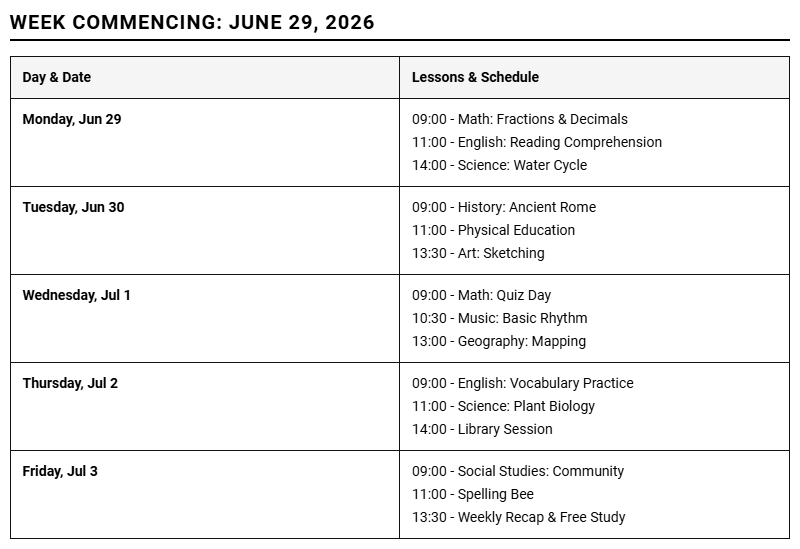
Managing fragmented lesson plans and chaotic classroom schedules remains a persistent struggle for modern educators. While traditional school budgets or district grants typically fund standard textbooks, these resources often stipulate rigid structures that limit day-to-day adaptability. Transitioning to a dedicated Teacher Lesson Weekly Planner printable calendar grants instructors the immediate flexibility needed to design customized curriculum pathways. Below, we examine how implementing these downloadable PDF templates enhances instructional organization and streamlines weekly prep work.
Create Your Teacher Lesson Weekly Planner
Done customizing?
Teacher Lesson Weekly Planner - Good to Know
Digital teacher planner
The modern classroom demands agility, and a digital teacher planner serves as the central hub for active educators. Transitioning from traditional paper binders to cloud-based systems allows teachers to access their entire curriculum from any device, anywhere. These planners integrate seamlessly with digital calendars, task lists, and resource files, minimizing the physical clutter on your desk.
By utilizing digital planning tools, educators can easily search past notes, duplicate recurring schedules, and share lesson ideas with colleagues in a single click. This streamlined approach offers several distinct advantages:
- Instant updates that sync across personal phones, tablets, and school laptops.
- Direct integration with school learning management systems (LMS).
- Environmentally conscious design that reduces paper waste.
Embracing a digital format empowers educators to reclaim valuable preparation time, transforming administrative overhead into opportunities for deep student engagement and innovative lesson creation.
Curriculum mapping layout
A comprehensive curriculum mapping layout acts as a bird's-eye view of an entire academic year, ensuring that all standards are met systematically. This layout aligns learning objectives, essential questions, resources, and assessments across weeks or months. It helps prevent gaps in student learning and ensures a balanced instructional pace throughout the term.
When designing an effective curriculum map, teachers must focus on horizontal and vertical alignment:
- Horizontal alignment: Ensuring consistency across different classrooms of the same grade level.
- Vertical alignment: Confirming that skills build logically from one grade level to the next.
Using a visual table or timeline layout helps identify overlaps or omissions in the syllabus. This deliberate organization ensures that teachers do not rush through critical concepts at the end of the term, providing a structured pathway for student success over the school year.
Notion lesson template
For educators seeking unparalleled customization, a Notion lesson template offers a modular database approach to instructional design. Notion allows teachers to build relational databases where lessons, resources, and standards are interconnected. A single entry can represent a lesson plan, a repository for handouts, and a tracker for grading metrics.
This dynamic environment adapts to diverse teaching styles. Educators can view their schedule as a calendar, a Kanban board, or a nested list with a simple toggle. This versatility makes it easy to organize complex information:
- Relational properties: Link daily activities directly to semester-long standards.
- Toggle headers: Hide complex instructions or teacher scripts to keep the screen clean.
- Web bookmark previews: Display visual links to online articles, videos, and interactive quizzes.
This system consolidates scattered files into a unified dashboard, transforming passive planning into an interactive experience.
Scope and sequence grid
A scope and sequence grid provides the foundational framework for educational delivery, detailing what will be taught and when. The "scope" refers to the breadth and depth of the content covered, while the "sequence" outlines the logical order of instruction. Together, they form a highly structured matrix that guides long-term instructional decisions.
This grid prevents instructional drift by establishing clear boundaries for each unit. Teachers can visualize the pacing of complex topics, allocating more time to difficult standards. It serves as a vital tool for department heads and administrators to monitor academic consistency across school sections.
By mapping out the entire scope at the beginning of the year, educators can confidently plan scaffolded support, ensuring students have the prerequisite knowledge necessary to tackle advanced projects as the curriculum progresses.
Backward design planner
The backward design planner flips traditional lesson planning on its head by starting with the desired end results. Based on the Understanding by Design (UbD) framework, this method requires teachers to identify learning goals and national standards before choosing daily classroom activities or instructional materials.
The planning process follows three distinct stages:
- Identify desired results: What should students know, understand, and be able to do?
- Determine acceptable evidence: How will we know if students have achieved these results?
- Plan learning experiences: What activities will lead to these outcomes?
By focusing on the assessment first, teachers guarantee that daily lessons directly support learning objectives. This purposeful alignment reduces busywork and ensures that every classroom minute actively moves students toward mastering key concepts.
Hyperlinked weekly spread
A hyperlinked weekly spread is the digital equivalent of an open planner on a desk, supercharged with instant navigation. Usually designed as interactive PDFs or slides, these spreads allow teachers to jump between weekly overviews, daily lesson pages, and specialized resource sections with a simple tap of a stylus or mouse click.
This format is particularly popular among users of tablet annotation apps. It provides a tactile, paper-like writing experience while retaining the powerful advantages of digital organization. A typical layout includes links to:
- Individual daily lesson pages with detailed step-by-step procedures.
- Dedicated seating charts and student participation rosters.
- External folders containing digital worksheets, videos, and presentation slides.
By eliminating the need to endlessly swipe through pages, hyperlinked spreads keep educators organized during fast-paced instructional blocks.
Google Slides teacher planner
The Google Slides teacher planner has become a staple in modern classrooms due to its collaborative nature and presentation readiness. Because Google Slides is cloud-based, planners can be accessed, edited, and shared in real-time. This is ideal for sharing plans with substitute teachers, administrators, or co-educators.
Teachers can design their slides to serve dual purposes: an administrative planner and a direct presentation tool for students. Slides can contain embedded timers, direct links to Google Drive assignments, and video clips that play automatically during lessons.
The platform's sharing features allow for seamless collaboration across grade-level teams. One teacher can update the math slides while another refines the science slides, instantly updating the master presentation for everyone. This shared workflow saves hours of redundant planning and fosters collaborative teaching.
Block scheduling template
Managing an extended class period requires a specialized block scheduling template. Unlike traditional 45-minute periods, block schedules typically run for 80 to 90 minutes. This format provides deeper learning opportunities but requires careful planning to maintain student focus and momentum throughout the entire block.
An effective template breaks the block down into distinct phases to keep students engaged:
- The Warm-up (10-15 mins): A quick retrieval practice activity to reactivate prior knowledge.
- Direct Instruction (15-20 mins): Focused chunk of content delivery to prevent cognitive overload.
- Collaborative Application (30-40 mins): Hands-on lab work, group discussions, or project-based learning.
- Reflection and Exit Ticket (10 mins): Synthesizing key takeaways and checking for understanding.
Using a block template ensures pacing remains brisk and lessons do not drag, turning long periods into dynamic learning workshops.
Co-teaching weekly planner
Effective collaboration is the cornerstone of inclusive classrooms, making a co-teaching weekly planner indispensable. This layout is specifically designed for general education and special education teachers to co-plan instruction, ensuring both educators have clear roles and responsibilities during every phase of the lesson.
A structured co-planning template clearly designates which co-teaching model will be used, such as:
- One Teach, One Assist: One leads while the other provides targeted support.
- Station Teaching: Dividing content and students into smaller learning groups.
- Parallel Teaching: Splitting the class in half to teach the same material with a lower student-to-teacher ratio.
By mapping out these roles in advance, both educators can play an active, valuable role in the classroom. This collaborative organization ensures that accommodations are built directly into the core curriculum rather than added as an afterthought.
UDL lesson template
A UDL lesson template integrates the principles of Universal Design for Learning to create flexible learning environments that accommodate all students. This planning methodology focuses on removing barriers to learning by offering multiple avenues for engagement, representation, and action or expression.
The template prompts educators to consider diverse learner needs from the very beginning of the planning process:
- Multiple means of engagement: How will we tap into student interests and sustain their motivation?
- Multiple means of representation: How can information be presented in different formats (visual, auditory, tactile)?
- Multiple means of action & expression: How can students demonstrate what they know in varied ways?
This proactively designed plan ensures that instruction is accessible to English language learners, neurodivergent students, and advanced learners alike, fostering an equitable and supportive classroom community.
Leave a comment