
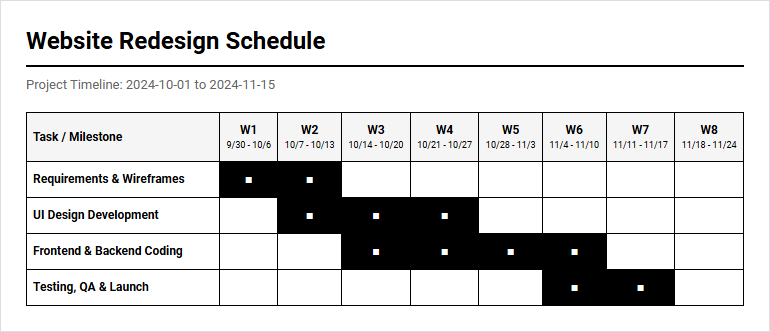
Managing shifting milestones across complex initiatives remains a constant struggle for project teams. While standard scheduling software provides basic tracking, our blank and custom printable calendar templates grant the immediate visual clarity needed to keep diverse stakeholders aligned. Note the stipulation: a timeline only succeeds if it realistically reflects team capacity. Whether managing a major product launch or a quarterly marketing campaign, this guide outlines how to select, customize, and deploy the ideal template for your next project timeline.
Create Your Project Timeline Calendar
Done customizing?
Project Timeline Calendar - Good to Know
Gantt Chart
A Gantt chart serves as a highly visual, horizontal bar chart used extensively in project management to illustrate a project schedule. It maps out individual tasks against a timeline, showcasing start dates, durations, and end dates. By utilizing this framework, project managers can easily monitor progress, identify potential scheduling overlaps, and ensure team alignment.
Modern digital Gantt charts offer interactive features, allowing teams to dynamically adjust timelines and assign responsibilities. Key benefits of this tool include:
- Clear visual representation of task timelines and project phases.
- Real-time tracking of project progress against initial planning.
- Easy identification of overlapping activities and resource bottlenecks.
This visual approach minimizes communication gaps, keeping stakeholders informed of milestone achievements and overall project health throughout the lifecycle.
Milestone
In project management, a milestone represents a significant point or event within a project timeline. Unlike standard tasks, milestones have zero duration and function as crucial checkpoints to mark the completion of major phases, deliverables, or critical decisions. They break a massive, complex project into manageable, measurable segments.
By tracking these key markers, teams can gauge whether they are on schedule without getting lost in daily operational details. Typical examples of milestones include:
- Phase completions, such as finishing the design phase.
- Key external deliverables, like obtaining client sign-off.
- Major testing, such as completing user acceptance testing.
Using milestones provides motivation to the project team and offers clear, high-level progress reports to stakeholders and sponsors who require quick status updates.
Critical Path Method
The Critical Path Method (CPM) is a step-by-step project management technique used to identify the sequence of crucial tasks that directly determine the minimum total duration of a project. By analyzing task durations, dependencies, and float times, CPM helps project managers determine which activities are critical and must be completed on schedule.
Any delay in a critical path task directly postpones the final project completion date. Implementing CPM offers several distinct advantages:
- Optimizes resource allocation by prioritizing critical activities.
- Identifies non-critical tasks that possess scheduling flexibility (float).
- Enhances risk management through precise mathematical modeling.
Applying this method ensures that project managers focus their attention and resources on the most impactful tasks, ensuring efficient project delivery and preventing costly timeline slippages.
Project Roadmap
A Project Roadmap is a high-level, visual overview of a project's goals, deliverables, and major milestones presented on a simplified timeline. Unlike detailed project schedules, a roadmap avoids micro-level task tracking, focusing instead on strategic alignment and long-term vision. It acts as a primary communication tool to align internal development teams, cross-functional partners, and external stakeholders.
A well-constructed roadmap provides immense value by:
- Communicating the strategic vision and overall direction clearly.
- Managing stakeholder expectations with a macro-level view of timelines.
- Bridges the gap between daily tasks and high-level business objectives.
By providing a clear, easily digestible summary of where the project is headed, the roadmap ensures that everyone understands the big picture and remains focused on shared organizational goals.
Time Blocking
Time blocking is a highly effective productivity technique where individuals divide their workday into distinct, dedicated blocks of time. Each block is reserved exclusively for completing a specific task or group of tasks, rather than working reactively from an open-ended to-do list. This method fosters deep focus, minimizes the cognitive load of multitasking, and helps professionals regain control over their schedules.
To implement this methodology successfully, professionals rely on several core principles:
- Reducing daily distractions and limiting context switching.
- Encouraging realistic scheduling by estimating exact task durations.
- Ensuring priority projects receive dedicated, uninterrupted attention.
By planning hours in advance, team members can combat procrastination and maintain steady progress toward project milestones, resulting in higher quality outputs and improved personal time management.
Task Dependencies
Task dependencies refer to the relationships between activities in a project, determining the order in which tasks must be performed. Recognizing these relationships is essential for building realistic project schedules and preventing bottlenecks. Dependencies dictate that certain tasks cannot begin or finish until another task has been initiated or completed.
Understanding these sequential linkages is vital, and they generally fall into four primary categories:
- Finish-to-Start (FS): Task B cannot start until Task A finishes.
- Start-to-Start (SS): Task B cannot start until Task A starts.
- Finish-to-Finish (FF): Task B cannot finish until Task A finishes.
Identifying these dependencies allows project planners to optimize resource workflows, anticipate potential delays, and maintain structural integrity across the entire project life cycle.
Sprint Schedule
Within agile frameworks, a Sprint Schedule outlines a fixed, time-boxed period, typically lasting two to four weeks, during which a development team completes a specific set of deliverables. The schedule begins with sprint planning, where the team selects high-priority items from the product backlog. Daily stand-ups maintain alignment, while the sprint concludes with a review and retrospective.
This structured iteration cycle relies on consistent events to drive progress:
- Sprint Planning: Defining the goal and scope of the iteration.
- Daily Stand-up: Brief daily check-ins to sync activities and identify blocks.
- Sprint Review: Evaluating outcomes and demonstrating functional deliverables.
This rhythmic scheduling encourages continuous improvement, rapid adaptability to changing requirements, and regular, incremental delivery of valuable, functional software or products.
Resource Allocation
Resource allocation is the strategic process of assigning and managing assets, including team members, equipment, budget, and materials, to support project activities. Efficient allocation ensures that the right resources are directed to the right tasks at the optimal time, maximizing productivity while avoiding resource burnout or underutilization.
Effective allocation requires continuous oversight to balance demands, offering major benefits:
- Prevents resource overallocation and maintains team morale.
- Optimizes project costs through structured budgeting and asset usage.
- Improves task execution speed by matching skills to requirements.
By continuously monitoring resource availability and workload distribution, project managers can make informed adjustments to resolve conflicts, maintain high morale, and deliver the project within established constraints.
Schedule Baseline
A schedule baseline is the approved version of a project schedule, complete with start dates, end dates, and target milestones, which is established prior to active execution. It serves as a benchmark against which actual project progress is measured. Any deviations from this baseline indicate whether a project is ahead of schedule or experiencing delays.
Maintaining a baseline is critical for performance measurement, facilitating key activities:
- Enables objective variance analysis during project execution.
- Facilitates accurate performance reporting for stakeholders.
- Acts as a formal point of reference for change control processes.
By locking in a baseline, project teams can systematically track historical performance, evaluate the impact of schedule adjustments, and implement corrective actions to steer the project back on course.
Lead and Lag Time
In project scheduling, lead and lag time are adjustments applied to task dependencies to introduce flexibility or acceleration into the timeline. Lead time is the amount of time a successor task can be advanced or overlap with its predecessor, accelerating the project schedule. Conversely, lag time is a mandatory delay inserted between dependent tasks, introducing a waiting period before the successor can begin.
Applying these adjustments correctly helps create highly realistic project plans:
- Lead Time Example: Commencing draft reviews while chapters are still being written.
- Lag Time Example: Waiting for concrete to dry before building the structure.
- Strategic Balance: Optimizing resource idle time without increasing risk.
Mastering these temporal offsets allows project managers to create highly accurate schedules that reflect real-world constraints and operational realities.
Leave a comment