
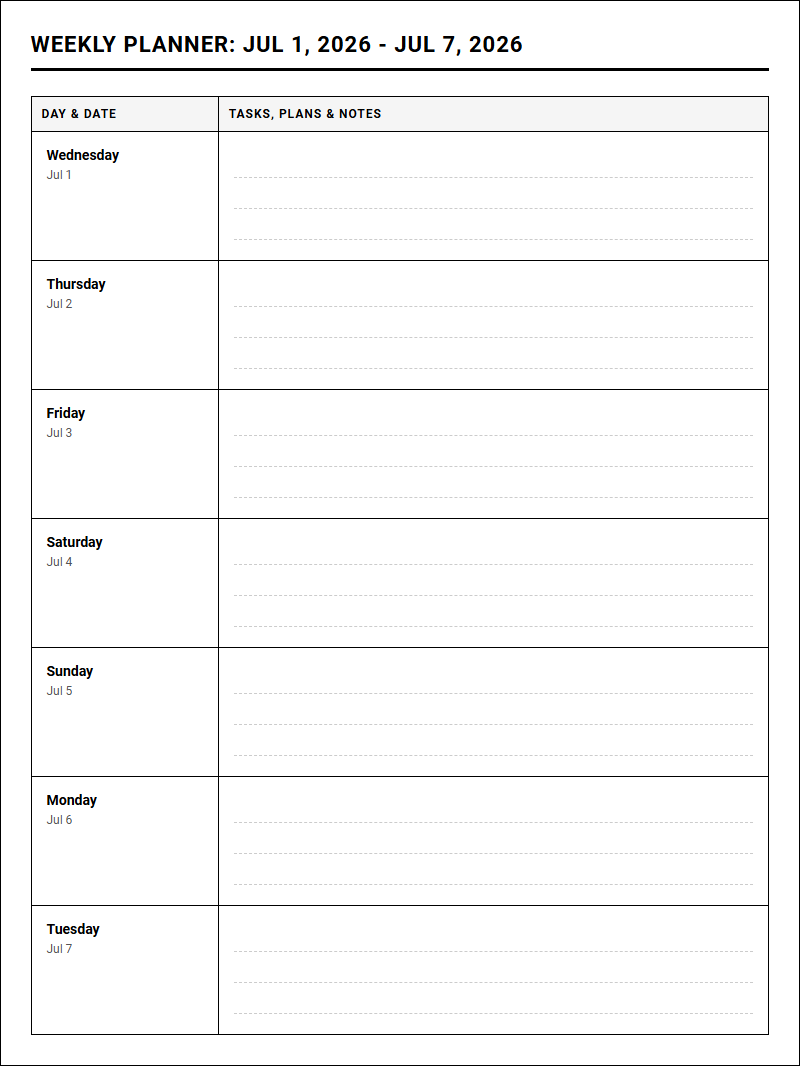
Balancing complex weekly schedules often overwhelms professionals trying to align daily operations with allocations from standard funding sources. Our Yearly Calendars printable calendar solves this by serving as a dedicated Weekly Planner Calendar. This system grants users immediate strategic clarity over annual goals, provided they adhere to the stipulation of consistent weekly updates. Utilizing proven frameworks like the Horizon Weekly Layout, this article outlines how to select, customize, and print your optimal planning tools.
Create Your Weekly Planner Calendar
| Day & Date | Tasks, Plans & Notes |
|---|
Done customizing?
Weekly Planner Calendar - Good to Know
Time blocking
Time blocking is a highly effective productivity technique where you divide your day into dedicated segments of time. Each block is reserved for completing a specific task or group of activities, which minimizes distractions and prevents cognitive overload. By scheduling your priorities beforehand, you gain control over your daily schedule instead of constantly reacting to external demands.
To implement this method successfully, consider the following best practices:
- Group similar tasks: Batch administrative chores, email replies, and creative work together.
- Add buffer time: Leave gaps between blocks to rest, transition, and handle unexpected events.
- Color-code your blocks: Visual cues help you quickly identify the nature of each task block.
This systematic approach transforms abstract goals into concrete appointments with yourself, ensuring that essential projects receive the focused attention they deserve throughout the busy workweek.
Undated weekly layout
An undated weekly layout offers unparalleled flexibility for individuals whose schedules fluctuate or those who occasionally skip planning weeks. Unlike traditional dated agendas, this layout allows you to write in the dates as you go, eliminating empty, wasted pages and the guilt that often accompanies unused planner sections. It is an ideal solution for students on academic breaks or freelancers with highly variable project cycles.
When choosing an undated format, you can customize your experience using these steps:
- Fill in the current month and days at the top of the columns.
- Highlight key milestones and deadlines using colored highlighters.
- Carry over unfinished tasks to the next clean page without feeling restricted by pre-printed calendars.
This layout serves as a blank canvas, adapting perfectly to your changing lifestyle and ensuring that your organization system remains functional, economical, and highly personalized.
Digital weekly template
A digital weekly template leverages modern technology to streamline your task management and scheduling. These interactive templates, compatible with platforms like Notion, Google Docs, or Obsidian, allow you to sync your schedule across multiple devices, collaborate with team members in real-time, and easily rearrange your agenda with simple drag-and-drop actions. The adaptability of digital spaces means you never run out of room for notes.
"The beauty of digital organization lies in its searchability; finding a note from months ago takes mere seconds."
Furthermore, digital templates can integrate with your calendar apps and automation tools, sending reminders directly to your phone. This seamless integration reduces the friction of manual updating, allowing you to focus your mental energy on execution rather than administrative maintenance.
Habit tracker integration
Integrating a habit tracker directly into your weekly agenda bridges the gap between daily routines and long-term goals. By placing your habit grid alongside your schedule, you maintain constant visibility over your personal development progress. This visual reminder encourages consistency, turning minor daily actions into powerful, compounding habits over time.
To maximize this integration, try tracking a balanced mix of habits:
Health:Hydration targets, daily steps, or sleep quality.Professional:Inbox zero, networking outreach, or skill practice.Mindfulness:Journaling, meditation, or reading time.
Checking off these boxes daily provides a satisfying dopamine hit, reinforcing positive behavior and helping you build a balanced lifestyle where self-care and professional productivity coexist harmoniously.
Weekly desk pad
A weekly desk pad is a wide-format paper planner that sits comfortably beneath your keyboard or on your desk surface, offering an immediate, bird's-eye view of your entire week. Because it remains permanently open and visible, it acts as a constant physical anchor for your daily priorities, preventing the "out of sight, out of mind" phenomenon common with closed journals or minimized digital tabs.
The spacious, landscape design is excellent for jotting down quick reminders, tracking weekly focus areas, and mapping out major appointments. At the end of the week, simply tear off the sheet and start fresh. This tactile routine provides a sense of renewal, allowing you to leave past stressors behind and approach the upcoming week with a clean slate and renewed focus.
Alastair method
The Alastair method is a minimalist, rapid-logging system popularized by Bullet Journal enthusiasts. It solves the common dilemma of planning future tasks without committing them to specific days prematurely. In this layout, you list your tasks in a single column down the page, while columns representing the days of the week run parallel alongside them.
To assign and track tasks, follow this simple notation system:
- Write down your task in the main description area.
- Place a small dot or icon in the column of the day you intend to perform it.
- When completed, cross out the dot or turn it into an "X".
This elegant framework allows you to view your weekly load at a glance, offering the freedom to migrate tasks dynamically without rewriting them multiple times.
Chronodex
The Chronodex is a unique, visual planning system that represents the 24-hour day as a circular diagram resembling a clock face. Divided into radial segments representing hours and sub-segments for minutes, it offers a highly intuitive way to visualize how time is distributed throughout your day. It is particularly favored by visual thinkers who struggle with traditional linear schedules.
Using the Chronodex involves shading or coloring the slices of the wheel that correspond to specific activities:
- Vibrant colors: Distinguish between high-intensity work, leisure, and sleep.
- Slices expanding outward: Indicate overlapping tasks or deep-focus sessions.
This graphical representation makes it instantly clear when you are overcommitted, helping you cultivate a healthier, more balanced relationship with your daily time budget.
Minimalist weekly agenda
A minimalist weekly agenda strips away the clutter of complex trackers, inspirational quotes, and detailed prompts, focusing purely on essential tasks and appointments. By utilizing generous whitespace, clean typography, and a simple layout, this approach calms the mind and reduces the cognitive friction associated with opening a busy planner. It encourages you to prioritize quality over quantity.
In a world saturated with digital noise, a minimalist agenda offers a peaceful sanctuary. It prompts you to ask: "What are the absolute vital tasks that require my focus this week?" By limiting your daily entries to three to five core objectives, you prevent overwhelm and ensure that your energy is channeled into the actions that yield the greatest impact.
iPad planner
An iPad planner combines the tactile satisfaction of handwriting with the immense power of digital organization. Utilizing an Apple Pencil and popular PDF annotation apps like GoodNotes or Notability, you can write, draw, and highlight directly on your digital pages just like paper, while enjoying advanced digital features that physical notebooks simply cannot offer.
Key advantages of transitioning to a tablet-based planner include:
- Infinite customization: Easily copy, paste, and resize your handwriting or elements.
- Multimedia integration: Insert photos, web links, and digital stickers seamlessly.
- Portability: Carry years of planners, notebooks, and journals in one slim device.
This hybrid solution provides an engaging, eco-friendly planning experience that adapts dynamically to your creative preferences and professional requirements.
Timeboxing
Timeboxing is a highly structured productivity strategy where you allocate a fixed, maximum unit of time-called a "box"-to a specific activity. Unlike open-ended scheduling, timeboxing forces you to stop working on a task once the designated time limit is reached. This constraint leverages Parkinson's Law, which states that work expands to fill the time available for its completion.
Implementing this technique involves a straightforward process:
- Estimate how long a task should realistically take and set a timer.
- Work with singular focus until the box closes.
- Evaluate your progress and determine if a new block is required later.
This practice builds momentum, combats perfectionism, and helps you maintain strict boundaries, leading to a highly productive and balanced work week.
Leave a comment