
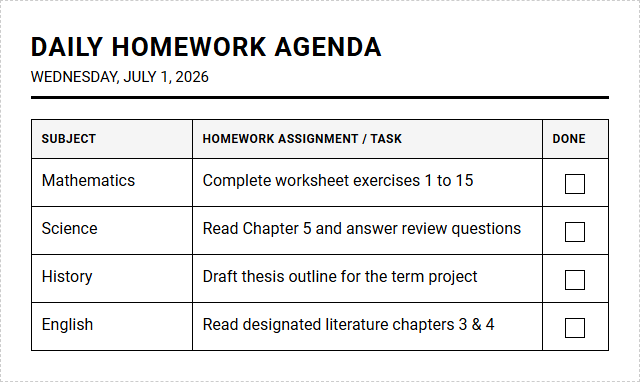
Staying on top of daily homework often overwhelms busy students. While standard school district funding usually restricts organizational tools to rigid, pre-printed planners, our Daily Agendas printable calendar grants students immediate, customizable control over their schedules. Under the stipulation that consistent daily tracking is required for success, leading preparatory academies routinely employ these templates. Below, we explore how to integrate this agenda to transform your student's academic routine.
Create Your Student Daily Homework Agenda
| Subject | Homework Assignment / Task | Done |
|---|
Done customizing?
Student Daily Homework Agenda - Good to Know
Time blocking
Time blocking is a highly effective productivity method where you divide your day into dedicated blocks of time. Each block is assigned to a specific task or group of tasks, eliminating the mental fatigue of deciding what to work on next. By scheduling your day in advance, you can protect your focus from constant interruptions and avoid the pitfalls of multitasking.
Implementing this strategy requires a structured approach to daily planning. You can optimize your calendar by using specific categories:
- Deep Work Blocks: Reserved for high-cognition tasks like writing essays or solving complex equations.
- Shallow Work Blocks: Designated for quick administrative chores, such as answering student emails.
- Buffer Blocks: Flexible windows to handle unexpected delays or take necessary rest.
Using this visual planning system ensures that your most critical academic goals receive the dedicated attention they deserve, transforming chaotic schedules into predictable, manageable routines.
Notion student dashboard
A Notion student dashboard acts as a centralized digital workspace, allowing students to manage their entire academic life in one cohesive system. Through customizable databases, sub-pages, and embedded widgets, you can effortlessly track assignments, lecture notes, exam dates, and personal goals. The flexibility of the platform means you can design a layout that perfectly matches your unique cognitive style and workflow requirements.
To build an optimized student workspace, consider incorporating the following essential databases:
- Course Directory: A master database storing syllabus details, professor contact info, and grading rubrics.
- Task Manager: A relational database linking homework deadlines directly to their respective courses.
- Notes Repository: A digital notebook utilizing templates for structured lecture transcription.
By consolidating your academic resources into a single dashboard, you eliminate the friction of searching through multiple apps and paper notebooks, keeping you organized all semester long.
Spaced repetition schedule
Spaced repetition is an evidence-based learning technique that involves reviewing study material at increasing intervals to improve long-term retention. Instead of cramming information immediately before an exam, you leverage the cognitive spacing effect to review facts just as you are about to forget them. This systematic approach strengthens neural connections and optimizes study efficiency.
An effective spaced repetition schedule relies on precise mathematical intervals to prompt your review sessions:
- Immediate Review: 1 day after initial exposure to the new concept.
- Short-Term Review: 3 days after the first review to reinforce basic recall.
- Medium-Term Review: 7 days later to solidify structural understanding.
- Long-Term Review: 14 to 30 days later to ensure deep conceptual integration.
By automating this schedule using digital databases or flashcard software, you can confidently master vast amounts of academic information with minimal effort and time investment.
Pomodoro tracker
The Pomodoro Technique is a time management philosophy that breaks your study sessions into highly focused intervals, typically 25 minutes long, separated by short 5-minute breaks. Using a dedicated Pomodoro tracker helps maintain high levels of mental stamina throughout the day. This structured rhythm prevents burnout, keeps your mind sharp, and trains your brain to resist digital distractions during active study windows.
To maximize the utility of your tracking system, follow this structured cycle:
- Choose a task: Select a single, clearly defined objective to work on.
- Set the timer: Work with complete focus until the 25-minute buzzer sounds.
- Record your progress: Log the completed interval to visualize your daily productivity.
- Take a break: Step away from your desk for 5 minutes to rest your eyes and mind.
After completing four cycles, reward yourself with a longer 20-minute break to fully recharge your cognitive batteries.
Eisenhower matrix
The Eisenhower matrix is a simple yet profound decision-making tool designed to help you prioritize tasks by urgency and importance. By dividing your responsibilities into four distinct quadrants, you can easily identify what needs immediate action and what can be scheduled for later, delegated, or eliminated entirely. This framework prevents the common mistake of focusing on reactive, low-value activities at the expense of long-term academic growth.
The four quadrants of the matrix dictate specific management strategies:
- Quadrant 1 (Do): Urgent and important tasks, such as an exam taking place tomorrow morning.
- Quadrant 2 (Schedule): Important but not urgent tasks, like drafting a research paper due next month.
- Quadrant 3 (Delegate): Urgent but not important tasks, such as booking group study rooms.
- Quadrant 4 (Eliminate): Neither urgent nor important activities, such as mindlessly scrolling social media.
Categorizing your tasks this way ensures your limited energy is consistently directed toward activities that produce real academic progress.
Task batching
Task batching is the productivity practice of grouping similar, low-effort tasks together and executing them in a single, dedicated session. By clustering activities like replying to emails, organizing digital files, or reviewing weekly vocabulary words, you minimize the heavy cognitive cost of context switching. Your brain can maintain a steady flow state when it performs repetitive, homogeneous actions without interruption.
To implement task batching in your academic routine, consider organizing your tasks into these functional categories:
- Admin Batch: Filing digital lecture PDFs, updating your homework tracker, and replying to group project messages.
- Reading Batch: Reading assigned textbook chapters for multiple courses back-to-back.
- Creative Batch: Brainstorming essay topics, outlining presentation slides, and designing study diagrams.
Structuring your week around batched tasks allows you to complete routine admin work quickly, leaving substantial, uninterrupted windows open for deep intellectual exploration.
Daily highlight
The daily highlight method is a minimalist productivity strategy that requires you to choose just one essential task to focus on and accomplish each day. While you will likely complete other smaller tasks throughout your schedule, your daily highlight represents the single most impactful goal that will make your day successful. This approach combats overwhelm by giving you a clear, achievable target amidst a sea of endless academic demands.
When selecting your daily highlight, consider these three criteria to ensure its effectiveness:
- Urgency: Is there a pressing deadline that must be met by tonight?
- Satisfaction: Which completed task will bring you the greatest sense of relief and accomplishment?
- Joy: Is there a creative project that you genuinely want to dedicate your peak energy toward?
Focusing your intent on a single highlight daily brings clarity, purpose, and a consistent sense of victory to your academic journey.
Active recall tracker
Active recall is an evidence-based learning strategy that forces your brain to retrieve information from memory rather than passively rereading textbooks. Implementing an active recall tracker allows you to systematically test your understanding of core concepts and log your performance over time. This targeted tracking reveals your actual retention levels, highlighting exact topics that require additional study before exam day arrives.
A robust active recall tracker should record specific key data points for every study session:
- Target Concept: The specific formula, vocabulary word, or historical event being tested.
- Retrieval Date: The exact day you attempted to recall the information.
- Confidence Score: A rating from 1 to 5 indicating how easily and accurately you recalled the details.
Consistently monitoring your retrieval efforts ensures your study sessions remain highly efficient, target actual knowledge gaps, and build unshakable academic confidence.
Gamified study tracker
A gamified study tracker turns your academic responsibilities into an engaging, game-like experience by incorporating elements like experience points, levels, and quest rewards. By treating your study sessions as quests and difficult exams as boss battles, you can dramatically increase your intrinsic motivation. This design leverages psychological feedback loops, transforming boring study routines into an adventure where every completed task directly contributes to your virtual character's growth.
You can structure your gamified tracker around these core gaming mechanics:
- Experience Points (XP): Earn points for every productive minute spent studying or reading.
- Level Up: Reach new developmental milestones as your accumulated XP passes specific thresholds.
- Custom Rewards: Redeem earned points to unlock real-life rewards, like watching an episode of your favorite show.
Gamifying your progress turns daily discipline into an interactive challenge, keeping you consistently engaged with your coursework over long semesters.
Digital homework log
A digital homework log is an essential organization tool designed to help students track upcoming assignments, project milestones, and reading requirements. Unlike traditional paper planners, a digital log offers dynamic features like automatic deadline reminders, customizable views, and quick search capabilities. This digital system ensures that no assignment slips through the cracks, allowing you to plan your study sessions around accurate, real-time data.
Your digital homework log should display several critical metadata fields for optimal organization:
- Due Date: The precise deadline, which can trigger automatic notifications before the date arrives.
- Course Tag: Color-coded labels to quickly filter assignments by academic subject.
- Status Indicator: Visual tags such as Not Started, In Progress, or Submitted.
Maintaining a clean, updated digital log reduces academic anxiety, streamlines your workflow, and provides a clear roadmap to achieving your educational goals.
Leave a comment