
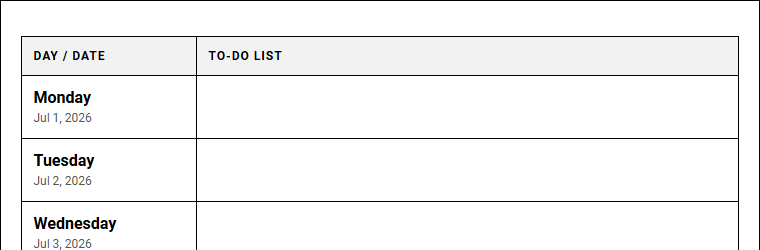
Struggling to balance daily tasks often leads to overwhelming organizational fatigue. While corporate development funding sources traditionally subsidize complex software, simpler paper-based tools offer superior focus. Our Weekly Planners printable calendar grants immediate cognitive relief by externalizing mental clutter. However, as a strict stipulation, this tool requires daily engagement to prevent task backlog. Successful project managers rely on this exact To Do List Weekly Organizer to maintain momentum. Below, we outline actionable steps to structure your weekly layout.
Create Your To Do List Weekly Organizer
Done customizing?
To Do List Weekly Organizer - Good to Know
Time blocking
Time blocking is a highly effective productivity method where you divide your day into dedicated blocks of time. Each block is assigned to a specific task or group of activities, ensuring your focus remains uninterrupted. Instead of working from an endless, overwhelming to-do list, time blocking forces you to commit to concrete schedules. This approach minimizes the cognitive load of decision fatigue, as you already know what to do at any given moment.
By allocating distinct periods for deep work, administrative chores, and breaks, you create a realistic blueprint for your day. Professionals who implement this strategy often experience a dramatic reduction in procrastination and multitasking. To get started, you should:
- Audit your daily habits to understand your natural energy levels.
- Estimate task durations as accurately as possible.
- Map them onto your calendar using visual color-coding.
This proactive planning transforms abstract goals into manageable daily achievements, fostering a healthier work-life balance.
Eisenhower matrix
The Eisenhower Matrix, also known as the Urgent-Important Matrix, is a powerful decision-making framework designed to help you prioritize tasks by urgency and importance. Created by Dwight D. Eisenhower, this method divides your workload into four distinct quadrants:
- Quadrant 1: Do first (Urgent and important tasks that require immediate action).
- Quadrant 2: Schedule (Important but not urgent tasks vital for long-term growth).
- Quadrant 3: Delegate (Urgent but unimportant tasks that can be assigned to others).
- Quadrant 4: Eliminate (Neither urgent nor important activities that serve as distractions).
Utilizing this matrix allows you to distinguish between superficial busywork and high-impact goals, optimizing your daily energy expenditure. It fosters a disciplined approach to workload management, ensuring you focus critical resources where they yield the greatest return, which leads to sustained professional and personal progress.
Habit tracker
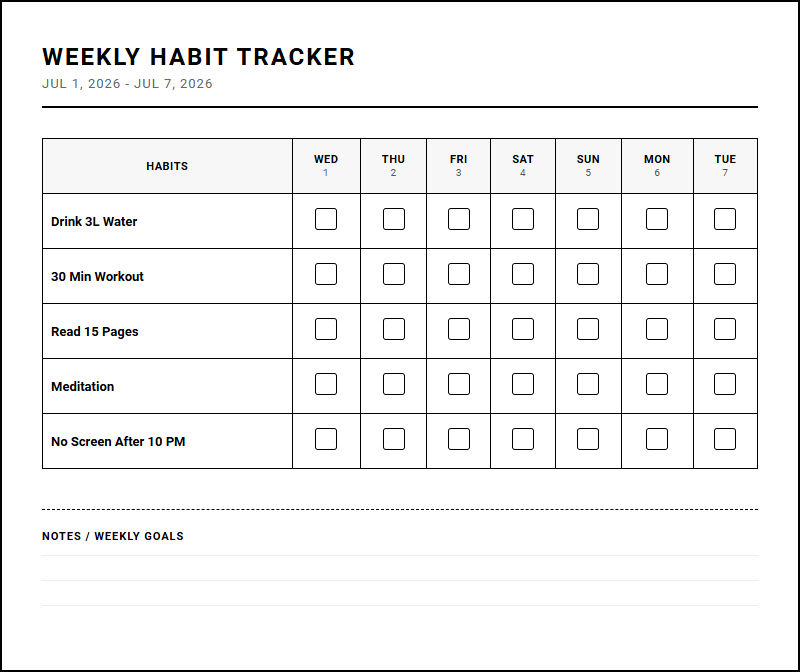
A habit tracker is an invaluable tool for building positive routines and eliminating detrimental behaviors. By visually recording your daily progress, you create a continuous chain of success that leverages the psychological urge to maintain consistency. Whether you utilize a simple paper journal, a dedicated mobile application, or a customized spreadsheet, tracking your habits provides immediate feedback and a sense of reward. This tangible progress reinforcement strengthens your neural pathways, making the desired actions more automatic over time.
Furthermore, habit trackers offer insightful historical data, allowing you to identify:
- External triggers that disrupt your focus.
- Peak performance periods during your week.
- Recurring obstacles that hinder your routine.
Over time, this practice shifts your focus from sporadic bursts of motivation to steady, incremental progress, acting as a personal accountability partner.
Weekly review
Performing a comprehensive weekly review is a cornerstone habit of highly organized individuals. This reflective practice involves stepping back from daily execution to assess your achievements, analyze bottlenecks, and realign your trajectory with long-term goals. During a typical weekly review, you should empty your physical and digital inboxes, update project statuses, and preview the upcoming week's calendar.
This process prevents tasks from slipping through the cracks and ensures that your daily actions align with your broader professional and personal priorities. It provides a structured opportunity to:
- Celebrate small victories that boost overall morale.
- Learn from setbacks to refine your workflow.
- Declutter your cognitive space for the days ahead.
By dedicating just one hour at the end of each week to this practice, you transition from a reactive state of crisis management to a proactive state of strategic design.
Task batching
Task batching is a productivity technique that involves grouping similar, low-concentration tasks together and completing them during a single, dedicated session. This approach directly combats the high cognitive cost of context switching, which occurs when you constantly bounce between unrelated activities like writing reports, answering emails, and attending meetings. By consolidating similar duties, you allow your brain to enter a state of flow, maintaining a singular focus that enhances execution speed and accuracy.
Common examples of task batching include:
- Processing all communication at designated times of the day.
- Conducting administrative work in one single afternoon block.
- Creating content outlines in a continuous, focused session.
This method streamlines your cognitive energy, reduces administrative friction, and frees up larger, uninterrupted blocks of time for deep, creative work. Implementing this system improves daily efficiency, minimizes mental fatigue, and maximizes overall output.
Notion template
A custom Notion template offers a highly adaptable, centralized workspace designed to streamline your personal and professional organization. Notion's modular block system allows you to build databases, project boards, and knowledge repositories tailored precisely to your unique workflow requirements. By utilizing a pre-designed template, you bypass the intimidating hurdle of building a system from scratch, gaining immediate access to optimized layouts for:
- Goal tracking and key results measurement.
- Meeting notes and collaborative project briefs.
- Daily agendas integrated with master task databases.
These templates facilitate seamless integration between different areas of your life, connecting your daily task list directly to your high-level objectives. The collaborative features of these systems also make them ideal for team alignment, ensuring everyone accesses a single source of truth. Utilizing a template optimizes your digital workspace and establishes a clear path toward sustained productivity.
Kanban board
The Kanban board is a visual project management tool designed to help you visualize work, limit work-in-progress, and maximize efficiency. Originating from Japanese manufacturing principles, this system uses cards, columns, and continuous improvement to help teams and individuals manage workflows dynamically. Typically, a basic Kanban board consists of at least three columns:
- To Do: Tasks waiting to be started.
- In Progress: Active tasks currently being worked on.
- Done: Completed objectives ready for review.
This simple structure provides instant, real-time clarity on the status of any project, making bottlenecks immediately apparent before they derail your timelines. By physically or digitally moving task cards across columns, you experience a rewarding sense of progress while keeping active workloads manageable. Whether managing software development or personal errands, a Kanban board fosters collaborative transparency and agile execution.
Time boxing
Time boxing is a goal-oriented time management technique where you allocate a fixed, maximum time limit to a specific activity in advance. Unlike time blocking, which designates open periods for general work, time boxing creates a strict boundary, forcing you to complete the task within the established frame. This artificial scarcity leverages Parkinson's Law, which states that work expands to fill the time available for its completion.
By limiting the time you allow yourself, you achieve several benefits:
- Increased focus by working against a ticking clock.
- Discouraged perfectionism through hard stop limits.
- Rapid decision-making on complex project steps.
Once the time box expires, you must stop working, review your progress, and transition to the next scheduled activity. This disciplined approach builds consistent momentum across diverse responsibilities.
Digital planner
A digital planner combines the tactical benefits of traditional paper planning with the dynamic flexibility of modern technology. Accessible across tablets, smartphones, and computers, a digital planner allows you to organize your schedule, write notes, and track habits without the physical bulk of paper books. Many digital planners feature interactive hyperlinks, cloud synchronization, and customizable layouts that adapt to your changing lifestyle.
This mobility ensures that your schedule is always within reach. Key advantages include:
- Instant searchability to locate past notes quickly.
- Seamless editing without messy erasures or scribbles.
- Multimedia integration for attaching relevant files or images.
This convergence of structure and flexibility makes it an essential tool for modern professionals seeking to streamline their daily organization, reduce environmental waste, and maintain a highly organized, paperless lifestyle.
Hyper-scheduling
Hyper-scheduling is an advanced time management system that takes time blocking to its logical extreme by scheduling every single minute of your day. This micro-scheduling approach eliminates ambiguity by assigning specific tasks, breaks, transitions, and personal activities to precise, granular time increments. While it may appear overly rigid initially, hyper-scheduling actually provides immense cognitive freedom by removing the need for real-time decision-making throughout the day.
You no longer waste valuable willpower determining what to do next; you simply follow your highly detailed blueprint. This method is particularly beneficial for:
- High-demand executives managing multiple departments.
- Freelancers balancing numerous client deliverables.
- Students coordinating classes, study sessions, and work.
By accounting for transit times, rest periods, and unexpected interruptions, hyper-scheduling creates an incredibly realistic map of your capacity, preventing overcommitment and optimizing daily output.
Leave a comment