
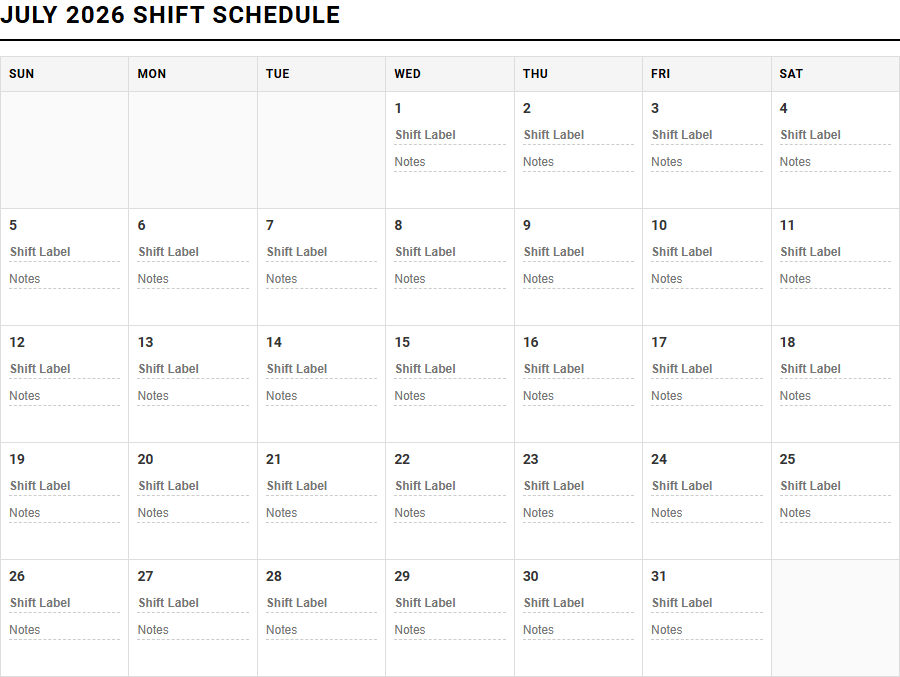
Managing erratic shift patterns often leads to scheduling conflicts and personal burnout. While corporate digital portals provide raw roster data, they frequently lack personal utility. Our printable Monthly Shift Work Scheduler Calendar grants you immediate offline clarity and control over your time.
Though this manual tool requires active updating rather than automated syncing, it excels at mapping complex rotations like DuPont or 24/7 rotating shifts. Below, we explore how to optimize this printable resource to master your monthly schedule.
Create Your Monthly Shift Work Scheduler Calendar
Done customizing?
Monthly Shift Work Scheduler Calendar - Good to Know
Rotating shift calendar
A rotating shift calendar systematically cycles employees through different working hours, typically transitioning between day, evening, and night shifts. This dynamic framework prevents burnout by distributing undesirable hours fairly across the entire workforce. It is highly valued in fields requiring continuous coverage, such as law enforcement and emergency services.
Key advantages of rotating shifts include:
- Balanced workload distribution among team members.
- Continuous operational coverage without hiring additional staff.
- Enhanced skill sharing as employees work across different daily periods.
By implementing a structured rotation cycle-such as weekly or bi-weekly changes-organizations maintain operational continuity. Managing these complex rotations requires careful planning to ensure compliance with labor laws and to protect employee health, particularly regarding circadian rhythm disruption. A well-designed rotation calendar balances organizational demands with human biological needs, fostering a healthier, more productive work environment.
Employee scheduling software
Modern employee scheduling software revolutionizes how managers allocate human resources. By automating the creation of weekly and monthly schedules, these digital platforms eliminate manual errors and drastically reduce administrative overhead. They represent a significant upgrade from paper-based tracking or static documents.
Key features often include:
- Real-time communication channels for rapid shift swaps.
- Automated compliance tracking for national and local labor laws.
- Instant notifications sent directly to staff mobile devices.
Incorporating scheduling software into your business operations streamlines workflow efficiency. Managers can easily match labor supply with customer demand fluctuations, minimizing unnecessary overtime costs. Furthermore, cloud-based scheduling databases offer unprecedented accessibility, allowing employees to view their shifts, request time off, and update their availability from any location. This level of transparency boosts staff morale and reduces turnover.
DuPont shift schedule
The DuPont shift schedule is a highly structured 12-hour rotating system designed to provide continuous 24/7 operational coverage. Named after the company that popularized it, this pattern operates on a 4-week cycle utilizing four separate crew configurations. It is particularly common in heavy manufacturing and chemical plants.
The cycle consists of the following sequence:
- Four consecutive night shifts, followed by three days off.
- Three consecutive day shifts, followed by one day off.
- Three consecutive night shifts, followed by three days off.
- Four consecutive day shifts, followed by seven consecutive days off.
The prominent feature of this system is the consecutive seven-day rest period, which employees highly value for personal recovery and work-life balance. However, the 12-hour blocks demand high physical endurance, making ergonomic planning essential. Organizations must monitor employee fatigue levels to ensure safety during the extended working hours of the DuPont rotation.
Automated roster generator
An automated roster generator leverages advanced algorithms to produce optimized staff schedules in a fraction of the time required for manual planning. By analyzing variables such as employee availability, skill sets, wage budgets, and historical labor demands, these smart systems construct conflict-free shifts automatically.
Benefits of automated roster engines:
- Eliminates scheduling conflicts and double-bookings.
- Maximizes budget efficiency by preventing unauthorized overtime.
- Adapts dynamically to unexpected staff absences and sick leave.
By removing human bias from the scheduling process, automated roster generators ensure a fair distribution of shifts among the workforce. This technology enables managers to focus on strategic growth rather than tedious administrative tasks. Consequently, businesses experience improved operational agility, allowing them to scale operations smoothly during peak seasons without sacrificing schedule quality or accuracy.
Split shift planner
A split shift planner is an indispensable tool for industries like hospitality, retail, and public transit, where daily demand peaks during specific, non-consecutive hours. A split shift divides an employee's workday into two or more distinct parts separated by a prolonged, unpaid break. This approach keeps labor costs aligned with customer traffic.
To implement split shifts ethically and effectively, planners must consider:
- Local labor laws regarding split-shift premiums and compensation.
- Employee commute times during the midday break period.
- Fair rotation practices to prevent excessive worker fatigue.
Using a specialized planner ensures these fragmented schedules are organized transparently. It helps bridge the gap between peak operational hours-such as lunch and dinner rushes in restaurants-and off-peak periods. Accurate split shift planning keeps labor costs low while ensuring adequate staffing when customer traffic is at its absolute highest.
Excel shift schedule template
For small businesses and startups, an Excel shift schedule template offers a cost-effective, familiar, and highly customizable starting point for workforce management. Spreadsheets allow managers to build simple tables that track employee names, shift dates, and total hours worked without investing in expensive enterprise software.
Typical components of a functional Excel template include:
- Formulas that calculate daily and weekly labor hours automatically.
- Conditional formatting to highlight scheduling conflicts or overtime risks.
- Dropdown menus for quick role selection and status updates.
While spreadsheet templates lack the advanced automation of dedicated software, they provide immediate utility without a steep learning curve. However, as organizations grow, manual data entry in Excel becomes prone to human error and version control issues. Transitioning from basic templates to cloud databases becomes necessary when managing larger teams or complex compliance regulations.
Pitman scheduling system
The Pitman scheduling system, also known as the 2-2-3 schedule, is a popular 12-hour rotating shift pattern that provides continuous 24/7 coverage. Utilizing four distinct teams, this system ensures that employees never work more than three consecutive days, reducing cumulative physical strain.
The standard Pitman rotation operates on a two-week cycle:
- Two days on duty, followed by two days off.
- Three days on duty, followed by two days off.
- Two days on duty, followed by three days off.
A major benefit of this layout is that employees receive every second weekend off (Friday, Saturday, and Sunday), which significantly improves social life and family cohesion compared to other rotating patterns. The predictability of the Pitman schedule helps workers plan their lives months in advance, though the 12-hour shifts require robust physical stamina and mental alertness.
24/7 shift roster
Designing a 24/7 shift roster requires a meticulous balance of operational necessity, employee health, and labor law compliance. Industries like healthcare, emergency services, and manufacturing must maintain constant vigilance, requiring round-the-clock staffing solutions to function safely and effectively.
Successful 24/7 schedules often employ:
- Standardized patterns like the DuPont, Pitman, or Continental shifts.
- Adequate overlap periods for seamless shift handovers.
- Built-in rest periods to prevent cumulative exhaustion.
Creating an equitable 24/7 roster involves transparent communication with staff regarding shift preferences and rotation frequency. Managers must actively manage night shift rotations to mitigate sleep deprivation risks. By prioritizing employee well-being alongside operational demands, a 24/7 roster ensures continuous service delivery without compromising safety or service quality.
Mobile shift calendar app
In today's mobile-first world, a mobile shift calendar app is essential for modern workforce engagement. These applications place the schedule directly into the hands of employees, allowing them to manage their professional commitments from their smartphones at any time of day.
Core mobile features include:
- Instant push notifications for new schedules and updates.
- Easy-to-use interfaces for submitting time-off requests.
- Peer-to-peer shift trading boards with manager approval workflows.
By enabling real-time updates, mobile shift calendars reduce absenteeism and improve communication speeds. Employees can instantly view their roster, sync shifts with personal calendars, and claim open shifts on the go. This level of self-service autonomy fosters trust, improves retention rates, and ensures that the business remains fully staffed at all times.
Color-coded shift planner
A color-coded shift planner uses visual cues to simplify complex schedule layouts, making them easily digestible at a single glance. By assigning unique colors to specific roles, departments, locations, or shift types, managers can quickly assess staffing balance and identify critical coverage gaps.
Common color-coding strategies include:
- Red for morning shifts, blue for afternoon shifts, and black for night shifts.
- Distinct colors for different skill levels or certifications (e.g., managers vs. trainees).
- Highlighting open shifts or unassigned slots in bright yellow.
This visual organization reduces the cognitive load required to read a schedule. It allows managers to spot gaps in coverage instantly and ensures that all essential roles are staffed appropriately. A color-coded layout enhances clarity for employees as well, reducing confusion and preventing scheduling misunderstandings.
Leave a comment