
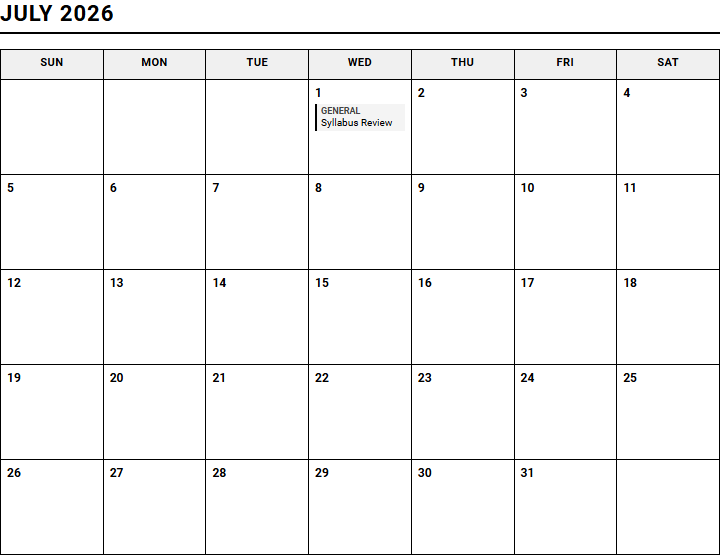
Managing competing academic deadlines across multiple courses often leaves students feeling overwhelmed and disorganized. While institutions frequently leverage departmental funding to license complex digital portals, these platforms often lack intuitive visual layouts.
A dedicated Class Assignment Tracker printable calendar grants students immediate, tactile clarity over their semester workload, provided they commit to the stipulation of daily manual updates. Using proven frameworks like our 15-Week Semester Overview, this guide outlines how to leverage printable trackers to streamline your study schedule.
Create Your Class Assignment Tracker
Add New Assignment
Done customizing?
Class Assignment Tracker - Good to Know
Syllabus AI Parser
The Syllabus AI Parser is a revolutionary tool designed to transform static, overwhelming academic documents into dynamic, actionable plans. By leveraging advanced machine learning algorithms, this tool scans course syllabi in PDF or Word formats, automatically extracting critical data such as assignment deadlines, exam dates, grading policies, and reading lists. Instead of spending hours manually inputting dates into a personal planner, students can upload their documents and watch the system organize their entire semester in seconds.
This semantic parser does more than just read text; it understands context. Key benefits include:
- Automatic Deadline Extraction: Instantly identifies due dates and schedules them chronologically.
- Weightage Calculations: Detects how much each assignment contributes to the final grade.
- Clutter Reduction: Filters out institutional boilerplate text to focus strictly on course deliverables.
By digitizing the syllabus, students reduce the cognitive load associated with administrative tracking, allowing them to dedicate their mental energy entirely to mastering the course content from day one.
Kanban Board
The Kanban Board offers a highly visual approach to workflow management, helping students organize their academic tasks through progressive stages of completion. Traditionally divided into columns like "To Do," "In Progress," and "Completed," this tool provides an instantaneous snapshot of current academic commitments. Students can represent essays, lab reports, and reading assignments as digital cards, moving them across the board as they make tangible progress.
This visual methodology enhances focus by limiting work-in-progress items. Here is how it optimizes study workflows:
- Visual Clarity: Drastically reduces academic anxiety by mapping out all tasks in a single, organized space.
- Flexible Customization: Allows users to add custom tags, priority labels, and color codes for different subjects.
- Progress Tracking: Provides a satisfying psychological boost as cards accumulate in the completed column.
Implementing a Kanban system ensures no assignment is forgotten, maintaining a steady, manageable momentum throughout the busiest parts of the school semester.
Grade Calculator
Managing academic performance requires strategic planning, and the Grade Calculator serves as an essential tool for maintaining high GPA standards. This interactive utility allows students to input their current assignment grades alongside their respective syllabus weightings. By simulating different academic scenarios, users can determine precisely what scores they need on remaining exams or projects to achieve their desired final course grades.
Key features of this analytical tool include:
- Weighted Grade Projections: Accurately calculates overall scores based on complex, multi-category grading criteria.
- Scenario Testing: Allows students to input hypothetical scores to prepare for finals week realistically.
- Target Setting: Keeps students motivated by defining clear, numerical benchmarks for upcoming academic submissions.
Having real-time access to accurate grade metrics eliminates guesswork, empowering students to allocate their study time efficiently where it will yield the greatest impact on their overall GPA.
Due Date Countdown
Procrastination often stems from a distorted perception of time, which is why the Due Date Countdown is a vital component of any academic toolkit. This feature displays active, real-time countdown timers for all upcoming assignments, quizzes, and exams. By presenting deadlines in terms of days, hours, and minutes rather than abstract dates, it instills a healthy sense of urgency and encourages proactive planning.
This dynamic interface helps students prioritize their time through several core functionalities:
- Real-Time Urgency: Visual countdowns prevent deadlines from unexpectedly sneaking up on busy students.
- Visual Urgency States: Color-coded warnings shift from green to amber and red as deadlines draw near.
- Daily Goal Alignment: Encourages students to tackle high-urgency tasks first, reducing last-minute cramming sessions.
Keeping time visible ensures that students remain fully aware of their schedules, helping them transition smoothly from passive planning to active, timely execution.
Pomodoro Timer
The Pomodoro Timer is a time-tested productivity tool designed to combat distraction and mental fatigue. By breaking the study session into highly focused intervals-typically 25 minutes of intense work followed by a 5-minute break-it aligns perfectly with the brain's natural attention span. After completing four cycles, students enjoy a longer, well-deserved break to rest and recharge their cognitive faculties.
Using structured intervals yields several key psychological and physical benefits:
- Enhanced Focus: Encourages deep work by setting a clear, short-term finish line for study sessions.
- Burnout Prevention: Frequent, scheduled breaks keep the mind fresh and prevent physical eye strain.
- Time Awareness: Helps students measure exactly how many focused cycles a specific academic task requires.
Integrating this structured approach into study routines helps build disciplined work habits, turning daunting study blocks into highly manageable, highly productive bursts of focused effort.
Time Blocking
Time Blocking is a highly effective scheduling method that involves dividing the day into dedicated blocks of time, each reserved for a specific task or subject. Unlike a simple to-do list, which outlines what needs to be done, time blocking establishes exactly when those tasks will be tackled. By dedicating specific hours to studying, attending classes, and resting, students build a balanced, predictable daily structure.
Implementing a structured calendar block system offers distinct organizational benefits:
- Single-Task Focus: Minimizes the cognitive cost of multitasking by dedicating specific blocks to single objectives.
- Realistic Scheduling: Forces students to confront how much time they actually have available in a day.
- Guilt-Free Free Time: Designates explicit blocks for relaxation, ensuring students can rest without feeling anxious about studying.
Structuring the day this way transforms a chaotic schedule into an intentional, highly organized blueprint for balanced academic success.
Academic Calendar Sync
Modern students manage their academic lives across multiple digital platforms, making Academic Calendar Sync an indispensable feature. This tool seamlessly bridges the gap between learning management systems and personal calendars like Google Calendar, Apple Calendar, or Outlook. By automatically syncing exam dates, lecture times, and project deadlines, it ensures that your entire schedule is unified in one centralized, easily accessible location.
This synchronization capability streamlines schedule management through several core features:
- Cross-Platform Harmony: Unifies academic, professional, and personal events into a single master schedule.
- Automatic Updates: Reflects any changes made by professors or university systems instantly on your personal devices.
- Custom Alerts: Delivers push notifications and email reminders well in advance of scheduled academic events.
Eliminating manual entry errors and maintaining a unified calendar keeps students organized, ensuring they never miss a class, meeting, or critical deadline again.
Task Prioritization Matrix
When faced with a mountain of homework, deciding where to start can be paralyzing. The Task Prioritization Matrix resolves this challenge by organizing academic tasks based on their urgency and importance. Often styled as a Eisenhower Matrix, this system categorizes work into four distinct quadrants, helping students identify what requires immediate attention and what can be scheduled for later or delegated entirely.
This strategic categorization helps students optimize their daily energy levels by sorting tasks into:
- Urgent and Important: High-priority assignments with looming deadlines that require immediate, focused action.
- Important but Not Urgent: Long-term projects and exam preparation that need structured scheduling.
- Urgent but Not Important: Administrative chores, quick emails, or minor tasks that should be handled swiftly.
This systematic approach helps students avoid the trap of busywork, directing their best energy toward the tasks that yield the highest academic returns.
Subtask Breakdown
Large academic projects, like research papers or senior theses, can often feel too massive to tackle, leading to procrastination. The Subtask Breakdown tool addresses this by dividing complex, overwhelming goals into smaller, manageable, and highly actionable steps. By taking a broad objective and parsing it into linear phases, students gain a clear roadmap that makes starting a project far less intimidating.
Breaking down milestones into smaller pieces provides a range of practical advantages:
- Clear Action Steps: Replaces vague goals like "write research paper" with explicit tasks like "outline introduction."
- Accurate Time Estimation: Makes it much easier to estimate how long individual steps of an assignment will take.
- Consistent Momentum: Encourages regular progress, as checking off smaller tasks builds confidence and continuous drive.
Transforming complex academic hurdles into a series of small, achievable victories ensures steady progress and reduces the stress associated with major deadlines.
Study Progress Dashboard
A Study Progress Dashboard serves as a personalized control center, offering a comprehensive, data-driven view of a student's academic journey. By compiling metrics from calendars, grade calculators, and task managers, the dashboard displays visual representations of completed study hours, overall GPA trends, and upcoming task volumes. This bird's-eye view helps students evaluate their study habits over time and make data-driven adjustments.
This centralized reporting dashboard enhances self-reflection through several key metrics:
- Visual Analytics: Displays graphs and charts tracking study hours, completed assignments, and grade improvements.
- Goal Tracking: Compares actual performance against predefined academic benchmarks and weekly study targets.
- Centralized Hub: Pulls together all organization tools into a single, cohesive, and easy-to-read user interface.
Having clear visibility into overall progress fosters a strong sense of accountability and pride, helping students stay deeply motivated and aligned with their educational goals.
Leave a comment