
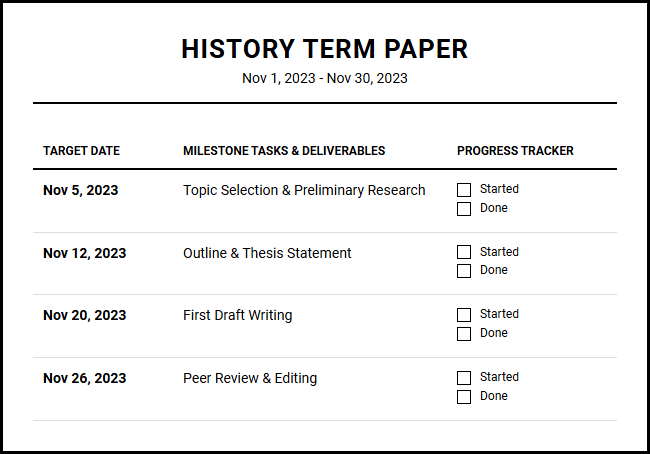
Managing multi-week classroom assignments often overwhelms educators, leading to missed deadlines. While district budgets and curriculum grants fund the physical materials for these initiatives, successful execution relies on precise scheduling. Utilizing a dedicated academic printable calendar grants instructors the seamless structure needed to align milestones. Note, however, that this tool requires active student participation to succeed. For instance, implementing this School Project Timeline Planner for the annual Science Fair consistently improves outcomes. Below, we outline how to maximize this resource.
Create Your School Project Timeline Planner
Done customizing?
School Project Timeline Planner - Good to Know
Gantt chart creator
A Gantt chart creator is an indispensable tool for visualizing complex academic timelines and long-term research projects. By mapping out tasks along a horizontal timeline, students and researchers can easily grasp the start dates, durations, and overlapping phases of various project components. This visual clarity helps prevent the common pitfall of underestimating how long research, drafting, and editing actually take.
Using this structured approach, you can organize your semester with precision:
- Task Dependencies: Identify which assignments require prior research to be completed first.
- Resource Allocation: Balance your daily workload by identifying heavily congested weeks.
- Progress Monitoring: Shade in completed segments to visually track your advancement toward submission.
This systematic breakdown ensures that massive dissertations or term papers are systematically divided into manageable, chronological steps, maintaining steady momentum throughout the academic term.
Backwards planning template
A backwards planning template flips the traditional scheduling method on its head by starting at the final due date and planning step-by-step toward the present. This methodology, often referred to as backward design, is highly effective for major milestones like thesis submissions or final exams. By working in reverse, you naturally eliminate procrastination because every intermediate deadline is directly anchored to the final goal.
To implement this technique effectively, follow these logical steps:
- Define the final submission date and the exact criteria for success.
- Establish the final review and editing phase immediately prior to submission.
- Determine the dates for rough drafting, outline creation, and initial literature review.
- Set the immediate next action step to begin work today.
This strategy ensures that you never run out of time, as every phase is allocated sufficient buffer room based on realistic, reverse-engineered deadlines.
Milestone tracking
When tackling multi-month projects, daily to-do lists can feel overwhelming and directionless. Milestone tracking solves this issue by establishing significant checkpoints throughout your academic journey. Milestones represent major achievements-such as completing a literature review, finishing a methodology section, or finalizing a dataset-rather than small, daily tasks. These checkpoints act as navigational beacons, keeping you oriented over long periods.
"By focusing on critical milestones, students can maintain high motivation levels, celebrating significant victories rather than getting bogged down in the minutiae of daily chores."
By dividing your semester into four or five major milestones, you create a sustainable rhythm. This high-level perspective prevents burnout, enhances focus, and provides a clear, encouraging metric of genuine academic progress.
Kanban board
The Kanban board is a visual workflow management tool designed to help you visualize your work, limit work-in-progress, and maximize efficiency. Originally developed in industrial settings, it has become a favorite among students for its intuitive, card-based interface. Tasks are represented as visual cards that move dynamically through distinct columns representing different stages of your workflow.
A standard academic Kanban board typically utilizes three fundamental columns:
- To Do: A backlog of all upcoming homework, readings, and exam preparation.
- In Progress: Active tasks currently receiving your direct focus and energy.
- Done: Completed assignments, providing a visual testament to your productivity.
By restricting the number of cards in the "In Progress" column, you naturally prevent cognitive overload and multitasking, forcing yourself to finish current projects before initiating new ones.
Assignment deadline tracker
Missed deadlines can severely impact academic performance, making an assignment deadline tracker an essential safeguard. Unlike general calendars, a dedicated deadline tracker prioritizes due dates, weight percentages, and urgency levels. This ensures that high-value assignments receive the attention and preparation they deserve well in advance.
Key features of an optimized tracker include:
First, automatic countdowns that show exactly how many days remain until submission. Second, grade weighting calculators that help you understand the proportional impact of each assignment on your final grade. By combining these variables, you can make informed decisions about where to direct your studying efforts during busy midterms and finals, ensuring that your energy is always invested where it matters most.
Group project collaboration tool
Group work often introduces coordination challenges, ranging from uneven participation to fragmented communication. Utilizing a dedicated group project collaboration tool mitigates these friction points by consolidating all project elements into a single shared space. This centralized platform fosters transparency, ensuring every team member is aligned on their specific responsibilities.
Effective collaboration is built upon three pillars:
- Task Delegation: Assigning clear ownership of specific sections to individual team members.
- Shared File Repositories: Storing research documents, drafts, and presentations in a central, accessible folder.
- Real-time Status Updates: Eliminating redundant check-in messages by updating task statuses instantly.
Providing this level of structure reduces friction, enhances accountability, and ensures that collaborative academic projects are completed harmoniously and on schedule.
Time blocking template
To-do lists often fail because they lack temporal context. A time blocking template addresses this issue by prompting you to allocate specific hours of the day to dedicated tasks. Instead of writing "study biology" on a vague list, you carve out a defined block from to specifically for that activity, treating your study sessions as unmissable appointments.
To optimize your daily time blocks, structure your day with intention:
- Schedule deep focus blocks during your peak cognitive hours, typically early in the morning.
- Group shallow tasks, like answering emails or organizing folders, into late afternoon blocks.
- Protect your personal life by blocking out recurring times for rest, meals, and physical exercise.
This structured discipline prevents distraction, helps combat procrastination, and establishes a healthy, sustainable balance between academic rigors and personal well-being.
Academic dashboard
An academic dashboard serves as your personalized control center, consolidating all aspects of your student life into one cohesive view. Instead of constantly switching between separate class portals, notes, and calendars, this unified hub aggregates your class schedules, active assignments, current grades, and research notes. This centralized design minimizes administrative friction, saving valuable mental energy.
An effective dashboard centralizes critical academic metrics, such as:
| Course Name | Current Grade | Next Major Deliverable |
|---|---|---|
| Organic Chemistry | A- | Lab Report (Friday) |
| Modern History | A | Term Paper (Next Tuesday) |
Having this high-level summary readily accessible allows you to spot academic trends early, identify classes that need extra attention, and maintain complete control over your semester.
Color-coded task manager
Visual organization plays a massive role in cognitive processing, and a color-coded task manager leverages this fact to enhance productivity. By assigning specific colors to different courses, priority levels, or types of work, you can scan your schedule and instantly understand your daily load. This reduces the cognitive load required to decipher a cluttered and disorganized agenda.
Consider adopting a standardized color taxonomy to streamline your workflow:
- Red: Critical deadlines, exams, and high-priority assignments due within 48 hours.
- Orange: Medium priority tasks, reading assignments, and ongoing research.
- Green: Completed items, extracurricular activities, and personal events.
This rapid visual feedback loop keeps you organized, helps you transition quickly between subjects, and ensures that high-priority tasks always stand out clearly.
Study block scheduler
An effective study session is defined by quality, not just quantity. A study block scheduler helps you structure your study sessions around proven cognitive techniques, such as the Pomodoro technique or spaced repetition. By breaking your study sessions into focused intervals followed by short, rejuvenating breaks, you maintain high levels of focus and retention over longer periods.
When configuring your study blocks, aim for a balanced, realistic rhythm:
- Focus Interval: Work for 25 to 50 minutes with absolutely zero external distractions.
- Short Break: Step away from your desk for 5 to 10 minutes to stretch, hydrate, or rest your eyes.
- Long Break: Every four cycles, take a longer 30-minute break to fully recharge your mental battery.
This intentional structure prevents cognitive fatigue, enhances information consolidation, and transforms studying from an exhausting marathon into a series of highly productive sprints.
Leave a comment