
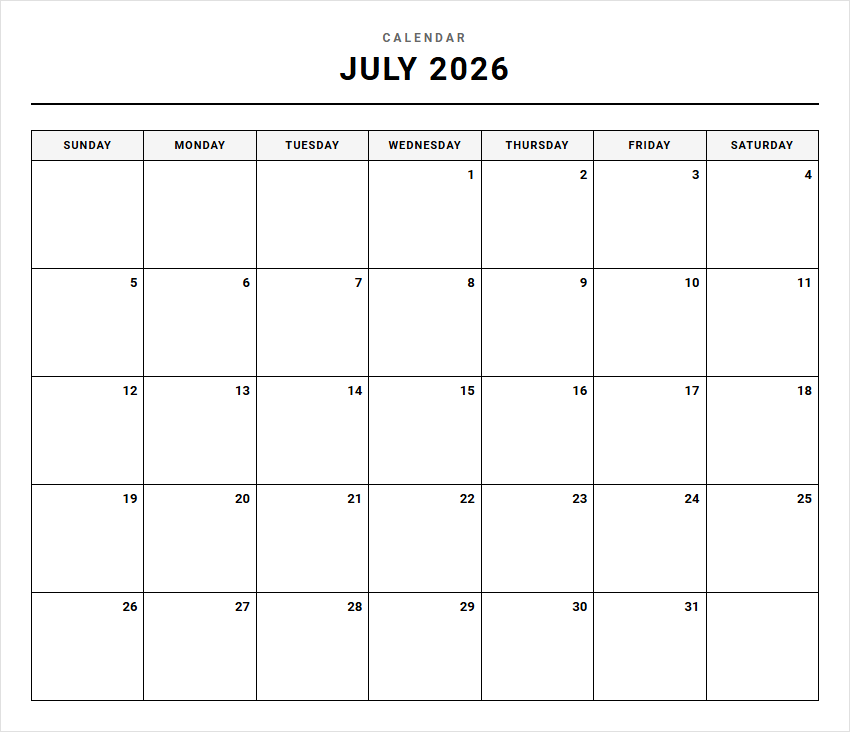
Managing a dynamic schedule with rigid planners often leads to cluttered, abandoned agendas. While standard planning resources, such as basic digital calendars, offer a foundation, they lack flexibility. Our printable Monthly Blank Calendars grant you complete layout control, serving as a versatile canvas. To maximize utility, certain formatting stipulations-like margin sizes and paper weight-must be considered. Whether tracking project sprints or family meal plans, these tools adapt to your unique workflow. Below, we outline how to select, customize, and print your ideal template.
Create Your Monthly Blank Calendar
Done customizing?
Monthly Blank Calendar - Good to Know
Undated monthly planner
An undated monthly planner offers unmatched flexibility for anyone looking to organize their schedule without the pressure of pre-printed dates. Unlike traditional calendars that lock you into a specific year or month, this versatile tool lets you start planning whenever you want. If you take a break for a few weeks, no pages go to waste. You simply write in the current month and fill in the dates yourself.
This format is highly favored by students, freelancers, and creative professionals who experience seasonal shifts in workload. By incorporating an undated layout into your routine, you gain complete freedom over your time management. Many planners also include dedicated sidebars for:
- Monthly goals to keep you focused on the big picture.
- Habit trackers to monitor daily routines.
- Prioritized to-do lists for essential tasks.
Fillable PDF calendar
A fillable PDF calendar bridges the gap between digital convenience and traditional paper organization. Users can easily type their schedules directly into the interactive document using any standard PDF reader on a computer, tablet, or smartphone. This makes it an exceptional tool for remote teams, students, and busy families who need to update and share schedules quickly.
Key benefits of utilizing this interactive format include:
- Perfect Legibility: No messy handwriting or crossed-out plans.
- Instant Sharing: E-mail or text the updated PDF to anyone in seconds.
- Eco-Friendly: Save paper by keeping the entire system on your device.
Once customized, you can print these calendars for physical display or keep them entirely digital. The crisp, clean fields ensure that your monthly overview remains uncluttered and professional.
Aesthetic blank calendar template
An aesthetic blank calendar template turns routine scheduling into an inspiring creative process. Designed with beautiful typography, soothing color palettes, and elegant layouts, these templates appeal to those who believe that functional tools should also be visually pleasing. Whether you prefer warm neutrals, soft pastels, or striking botanical borders, a well-designed template enhances your workspace ambiance.
These blank canvases allow you to color-code your tasks, add motivational quotes, or even include decorative digital stickers. Utilizing an aesthetically pleasing calendar can actually boost your productivity, as you are more likely to engage with and update a system that looks beautiful. It serves not only as a practical time-management resource but also as a piece of personalized desk decor that keeps you calm and focused throughout the busiest months of the year.
Google Sheets monthly calendar
For those who prioritize real-time collaboration and dynamic data, a Google Sheets monthly calendar is an exceptional planning solution. This cloud-based option allows multiple users to view and edit the same schedule simultaneously, making it ideal for managing household chores, team projects, or content marketing schedules. Because it lives in the cloud, you can access your calendar from any device with an internet connection.
Some of its most powerful features include:
- Conditional Formatting: Automatically color-code cells based on keywords.
- Dropdown Menus: Easily assign tasks to specific family or team members.
- Formula Integration: Track hours worked or budget goals directly alongside dates.
The sheer adaptability of spreadsheet software ensures that your monthly planning system grows alongside your evolving project management requirements.
Minimalist calendar grid
A minimalist calendar grid strips away all unnecessary distractions to focus entirely on what matters most: your time. Featuring clean lines, ample white space, and zero decorative elements, this design approach helps reduce mental clutter. When your calendar is not crowded with busy patterns or complex layouts, your eyes can easily scan the page to identify upcoming deadlines, meetings, and events.
This style is highly recommended for individuals who experience sensory overload or simply prefer a modern, sleek aesthetic. By focusing on pure functionality, a minimalist grid provides a peaceful, structured overview of your month. It allows your own tasks and appointments to stand out clearly, ensuring that you never miss an important date due to visual noise. It is the ultimate tool for intentional, distraction-free planning.
GoodNotes monthly template
A GoodNotes monthly template offers the satisfying feel of handwriting combined with the powerful capabilities of digital organization. Used on tablets with a stylus, these templates are perfect for paperless planners who still love the tactile experience of writing. Within the GoodNotes app, you can easily lasso and move appointments if plans change, highlight key events in vibrant colors, and insert digital stickers for personalization.
These templates often feature hyperlinked tabs, enabling seamless navigation between your monthly, weekly, and daily pages with a single tap. If you make a mistake, the instant undo button and digital eraser tool keep your pages completely flawless. It is a modern scheduling solution that delivers the absolute best of both the physical and digital planning worlds.
Editable blank calendar
An editable blank calendar is a highly versatile template that you can customize using standard word processing or graphic design software. Whether you use Microsoft Word, Apple Pages, or Canva, these files allow you to change fonts, adjust column widths, add branding elements, and modify layouts to fit your specific needs. This level of customization makes editable templates highly popular among small business owners, teachers, and event planners.
Instead of adapting your lifestyle to a pre-made planner, you can adapt this template to fit your unique daily flow. You can easily insert images, create customized headers, or append custom notes sections to create an individualized planning experience. It provides the perfect structural starting point while leaving all creative control entirely in your hands.
Bullet journal monthly spread
The bullet journal monthly spread is a highly personalized, creative method of tracking your time, tasks, and personal goals. Originating from the popular Ryder Carroll system, this layout typically consists of a clean calendar page paired with a flexible task list. It allows you to log events, track recurring habits, and set monthly intentions using rapid logging symbols.
The beauty of this approach lies in its absolute flexibility:
- Habit Trackers: Monitor sleep patterns, water intake, or budget goals.
- Mindfulness: Dedicate space for daily gratitude or mood tracking.
- Flexibility: Change the layout every single month depending on your current needs.
This hands-on system encourages you to slow down, reflect on your days, and intentionally design a schedule that aligns with your personal values.
Reusable dry erase calendar
A reusable dry erase calendar is a sustainable and highly visible planning tool perfect for shared environments like busy kitchens, classrooms, or office breakrooms. Typically mounted on a wall or refrigerator, this large-format calendar ensures that everyone in the household or team is aligned on upcoming events. Because it features a write-on, wipe-off surface, updating the schedule is effortless and zero-waste.
When a new month begins, you simply wipe the board clean with a damp cloth and write in the new dates. This physical presence acts as a constant visual reminder, preventing critical appointments from being forgotten in closed phone apps. It encourages collaborative scheduling, allowing anyone to grab a dry erase marker and add an event to the shared board.
Digital monthly calendar template
A digital monthly calendar template is the cornerstone of modern, efficient time management. Compatible with major platforms like Apple Calendar, Google Calendar, and Microsoft Outlook, these templates help streamline your daily life through automated syncing across all your devices. No matter where you are, your updated schedule is always accessible in your pocket.
These digital templates support features that paper counterparts simply cannot match:
- Automatic Reminders: Receive push notifications before meetings.
- Recurring Events: Set weekly or monthly tasks once and forget them.
- Location Mapping: Link physical addresses directly to your calendar events.
Embracing a digital scheduling workflow ensures that you remain organized, punctual, and highly responsive in our fast-paced, interconnected world.
Leave a comment