
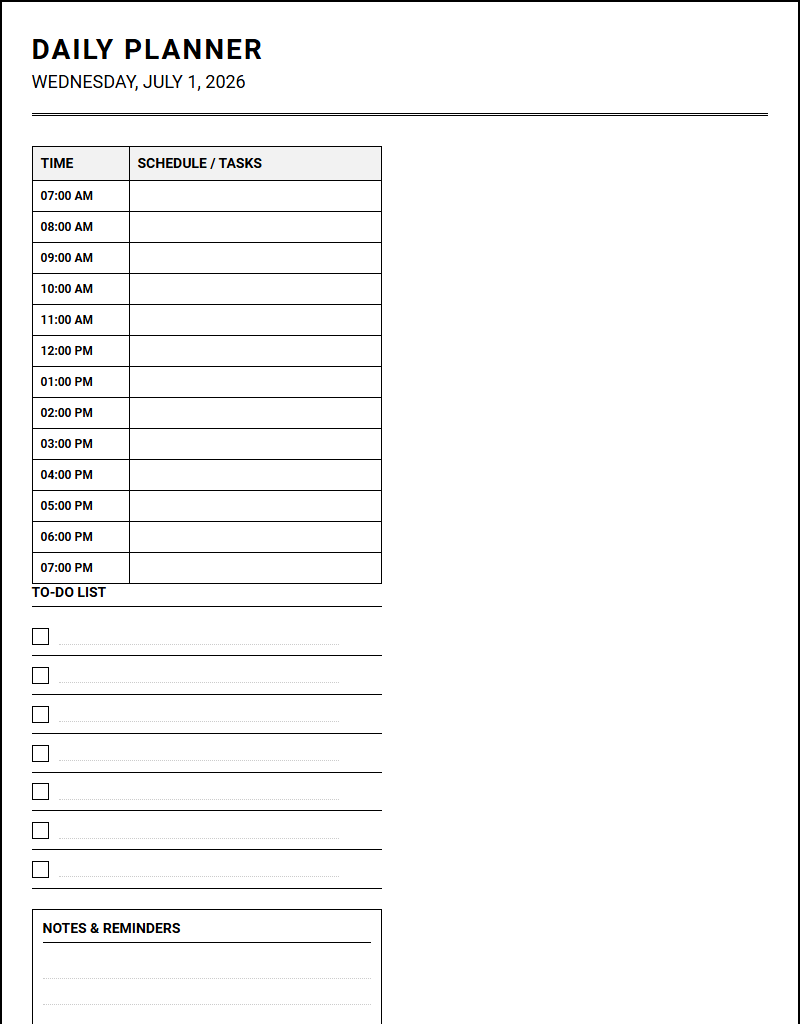
Managing chaotic daily schedules often leads to fragmented goals and missed deadlines. While securing capital through standard funding sources requires structured long-term timelines, execution ultimately happens on a day-to-day level. Utilizing a premium Yearly Calendars printable calendar grants the immediate strategic clarity required to align these high-level resources. Under the stipulation that yearly forecasting only succeeds when integrated with daily tracking-exemplified by structured layouts like the 12-month grid-this guide outlines how to optimize your daily planner calendar for peak efficiency.
Create Your Daily Planner Calendar
| Time | Schedule / Tasks |
|---|---|
| 07:00 AM | |
| 08:00 AM | |
| 09:00 AM | |
| 10:00 AM | |
| 11:00 AM | |
| 12:00 PM | |
| 01:00 PM | |
| 02:00 PM | |
| 03:00 PM | |
| 04:00 PM | |
| 05:00 PM | |
| 06:00 PM | |
| 07:00 PM |
Done customizing?
Daily Planner Calendar - Good to Know
Time blocking
Time blocking is a highly effective cognitive workflow strategy where you divide your day into dedicated segments of time. Instead of keeping an open-ended to-do list, you assign specific tasks to distinct temporal blocks, ensuring that every minute has a designated purpose. This methodical approach minimizes decision fatigue and prevents the constant cognitive friction associated with multitasking.
To implement this productivity framework successfully, consider these foundational steps:
- Analyze your priorities: Identify high-impact tasks requiring deep focus.
- Estimate task duration: Allocate realistic timeframes, adding buffer periods for unexpected interruptions.
- Defend your boundaries: Treat these blocks as non-negotiable appointments with yourself.
By visualising your day as a finite grid, you gain realistic insights into your actual capacity. This disciplined structure transforms vague aspirations into actionable daily segments, facilitating deep work phases that significantly boost your overall output and mental clarity throughout the workweek.
Digital planner
A digital planner merges the tactile satisfaction of traditional paper planning with the dynamic flexibility of modern technology. Typically designed as interactive PDF documents used on tablets, these tools allow users to write, draw, and organize their schedules digitally. This modern medium eliminates physical clutter while preserving the therapeutic benefits of handwriting, offering a sustainable alternative to paper products.
Key advantages of transitioning to a digital planning environment include:
- Infinite Customization: Easily copy, paste, move, and color-code elements without leaving messy erasures.
- Portability and Access: Carry years of archives, journals, and schedules within a single lightweight tablet.
- Eco-Friendly Architecture: Reduce paper waste entirely by managing your life through digital ink and screens.
Embracing a digital planner allows you to seamlessly integrate your professional commitments, personal reflections, and creative projects into a single, highly organized ecosystem that adapts instantly to your evolving lifestyle demands.
Habit tracker
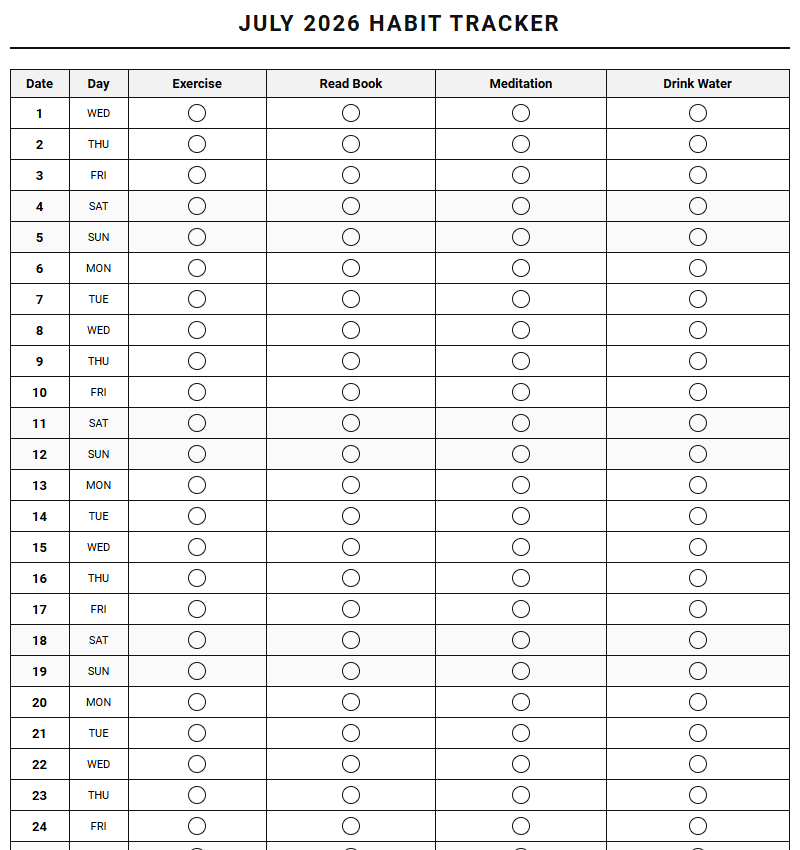
A habit tracker serves as a visual ledger of your daily discipline, transforming abstract goals into measurable progress. By systematically documenting your routines, you create a powerful psychological feedback loop that reinforces positive behavior. Every checked box or filled circle triggers a small sense of accomplishment, building the momentum necessary to sustain long-term personal transformation.
Integrating a habit tracker into your routine provides several structural benefits:
- Immediate Accountability: Creates a clear, honest record of whether you actually performed a desired action.
- Visual Progression: Watching a streak grow fosters a psychological desire to keep the chain unbroken.
- Pattern Recognition: Helps identify specific days or triggers where your consistency tends to waver.
Whether you are tracking hydration, exercise, reading, or meditation, this analytical tool clarifies the gap between your ideal self and your daily actions, grounding your personal growth journey in empirical reality.
GoodNotes template
A specialized GoodNotes template maximizes the functionality of the popular note-taking application, converting a standard tablet into a powerful organizational hub. These templates feature customized layouts, ranging from daily schedules to specialized project trackers, designed specifically to match the app's rendering engine. They provide structure to your digital handwriting, preventing blank-page anxiety and streamlining your information capture process.
Users can leverage diverse templates to optimize different areas of life:
- Cornell Notes: Ideal for students needing structured lecture summaries and active recall prompts.
- Weekly Overviews: Perfect for busy professionals mapping out deliverables and meeting schedules.
- Grid and Dotted Sheets: Excellent for bullet journalists, designers, and engineers drafting precise diagrams.
By importing bespoke templates, you personalize your digital canvas, ensuring that your unique planning methodology is supported by visually appealing, highly functional digital stationery.
Task batching
Task batching is a time management technique that involves grouping similar, low-cognitive tasks together and completing them in one dedicated session. Instead of responding to emails sporadically throughout the afternoon, you dedicate a single hour solely to communication. This approach leverages cognitive momentum, drastically reducing the severe productivity losses associated with constant context switching.
To implement this methodology, categorize your responsibilities into distinct operational buckets:
- Admin Batching: Clear invoicing, data entry, and file organization in one swift sweep.
- Communication Batching: Process emails, return phone calls, and respond to team messages collectively.
- Creative Batching: Dedicate uninterrupted blocks exclusively to writing, designing, or brainstorming.
By clustering comparable activities, you preserve your mental energy, maintain deeper levels of concentration, and complete repetitive obligations with significantly greater speed and fewer errors.
Aesthetic planner
An aesthetic planner elevates organization into an art form, proving that functionality and beauty can coexist harmoniously. These planners utilize carefully curated color palettes, elegant typography, minimalist layouts, and spacious designs to create a calming visual environment. The primary objective is to make the act of planning a pleasurable, mindful ritual rather than a stressful chore.
Key design elements that define an aesthetic planning tool include:
- Cohesive Color Schemes: Muted earth tones, soft pastels, or monochrome layouts that soothe the eyes.
- Generous White Space: Intentional breathing room that reduces cognitive overwhelm and clutter.
- Elegant Serif Fonts: Clean, modern typography that feels sophisticated and inspiring to use.
When your planning system feels beautiful, you are naturally more inclined to engage with it consistently. This artistic approach turns daily scheduling into a peaceful sanctuary of self-reflection.
Chronotype scheduling
Chronotype scheduling is a revolutionary approach to productivity that aligns your daily workload with your biological clock. Rather than adhering to a rigid, arbitrary nine-to-five schedule, you identify whether you are a morning person, a night owl, or an intermediate type, and organize your most demanding cognitive tasks around your natural energy peaks.
Understanding these biological profiles can optimize your daily efficiency:
- Lions (Morning): Tackle deep analytical work in the early morning; schedule meetings for the afternoon.
- Bears (Mid-day): Align your high-focus tasks between mid-morning and early afternoon.
- Wolves (Evening): Reserve creative brainstorming and complex problem-solving for the late afternoon and night.
By working with your physiology instead of fighting it, you reduce burnout, improve sleep quality, and achieve a state of flow with far less effort than traditional scheduling methods require.
Hyperlinked planner
A hyperlinked planner represents the pinnacle of digital organization, featuring embedded navigation tabs that allow you to jump instantly between different pages, months, and trackers. By mimicking the physical tabs of a paper notebook with digital links, these planners eliminate tedious scrolling, providing a seamless, lightning-fast user experience across your digital devices.
The intuitive architecture of these planners typically includes:
- Index Page: A central control panel linking to every template and tracker in the document.
- Yearly, Monthly, and Daily Links: Instant navigation to drill down from macro goals to micro tasks.
- Quick-Access Tabs: Persistent lateral or vertical tabs that remain visible on every single page.
This sophisticated design makes retrieving information effortless, ensuring that your planning system remain agile, integrated, and highly responsive to your fast-paced daily schedule.
Notion template
A Notion template leverages the power of relational databases to build a highly customized, all-in-one workspace. Unlike static documents, Notion templates allow users to filter, sort, and view their data in multiple formats, such as Kanban boards, calendars, timelines, or simple lists. This unparalleled versatility makes it the premier choice for project managers, creators, and students alike.
Key components of a robust Notion setup include:
- Relational Databases: Connect your daily tasks directly to your broader quarterly goals.
- Custom Properties: Tag, categorize, and assign deadlines to track project progression dynamically.
- Dashboard Views: Curate personalized landing pages displaying only what is relevant today.
Utilizing a pre-built template saves hours of setup time, providing a structured foundation that you can continuously adapt as your workflows, team collaborations, and personal systems evolve over time.
Bullet journal
The bullet journal is an analog mindfulness practice disguised as a productivity system, originally created by designer Ryder Carroll. Using a simple dotted notebook and a pen, this method encourages rapid logging of tasks, events, and notes using a standardized set of symbols. It functions as a planner, diary, and sketchpad all at once, adapting entirely to your immediate mental needs.
The core methodology relies on a few simple, powerful modules:
- The Index: A live table of contents that keeps your notebook structured and searchable.
- The Future Log: A bird's-eye view of events and goals scheduled months in advance.
- Monthly and Daily Logs: Spaces for rapid logging and immediate situational awareness.
This deliberate, slow-paced approach to organization fosters deep self-reflection, helping you filter out distractions and focus purely on what truly matters in your daily life.
Leave a comment