
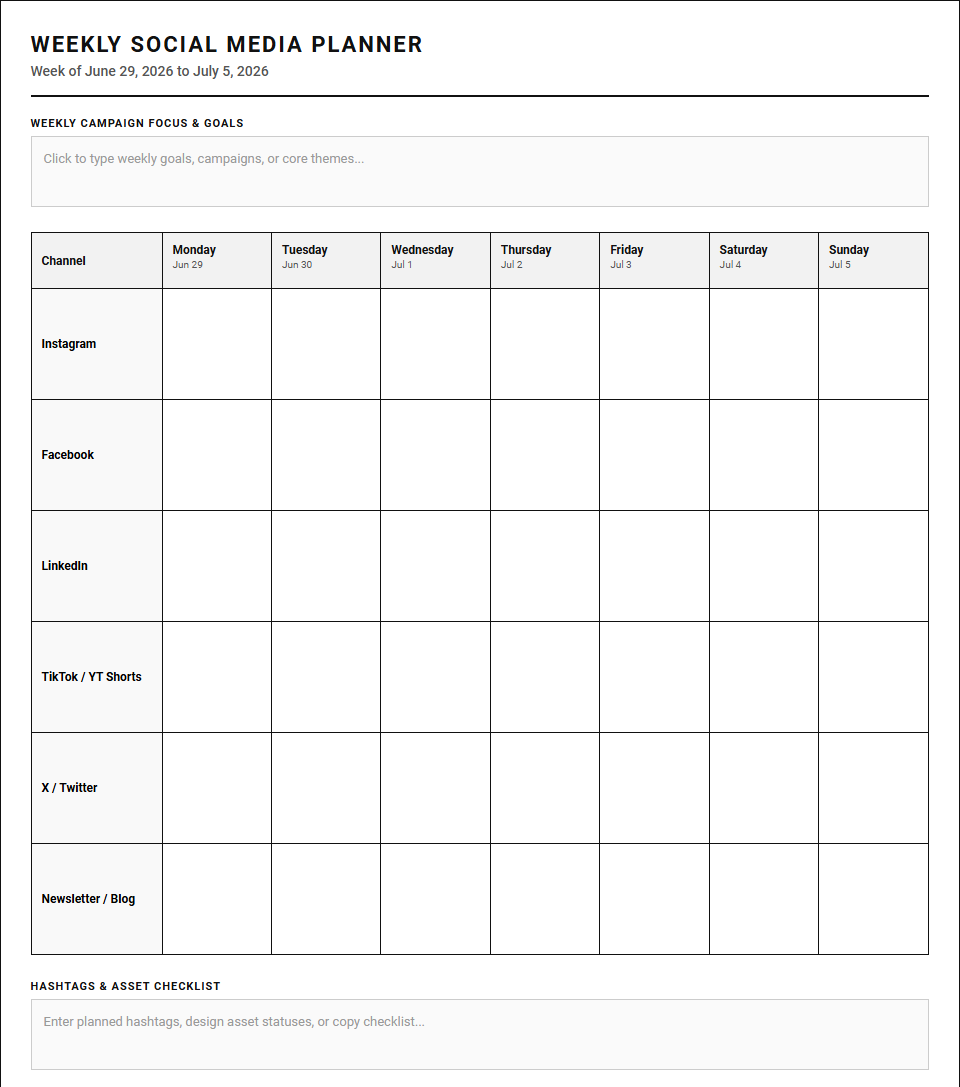
Maintaining a consistent social media presence often leads to creative burnout and chaotic, ad-hoc posting. While complex digital dashboards are standard industry tools, they can overcomplicate your workflow. Transitioning to a tactile, printable Weekly Planner calendar grants immediate cognitive clarity and strategic focus. To maximize effectiveness, however, creators must establish strict daily update habits. This guide explores how physical planners facilitate seamless scheduling-from tracking Instagram grids to timing LinkedIn campaigns-and outlines the best layouts to elevate your strategy.
Create Your Social Media Content Weekly Planner
| Channel | Monday | Tuesday | Wednesday | Thursday | Friday | Saturday | Sunday |
|---|---|---|---|---|---|---|---|
| TikTok / YT Shorts | |||||||
| X / Twitter | |||||||
| Newsletter / Blog |
Done customizing?
Social Media Content Weekly Planner - Good to Know
Content Calendar
A content calendar serves as the foundational blueprint for any successful digital marketing strategy. By organizing your publishing schedule in a highly visual timeline, you can easily maintain consistency across multiple social media platforms and digital channels. Marketing teams utilize these calendars to map out major promotional campaigns, align product launches, and ensure a steady, balanced flow of engaging material. Incorporating key details such as publication dates, target channels, specific content formats, and assigned team members prevents last-minute scrambles and reduces overall creative burnout.
Implementing a structured system offers several distinct advantages:
- Improved consistency: Keeps your brand highly visible in busy algorithmic feeds.
- Streamlined collaboration: Aligns copywriters, designers, and stakeholders in real-time.
- Strategic oversight: Facilitates an equal distribution of diverse media topics.
With a centralized scheduling system, brands can successfully execute complex campaigns while saving valuable resources.
Notion Content Planner
The Notion Content Planner has completely revolutionized how modern creators structure their daily digital workspace. Leveraging Notion's highly customizable databases, relational tables, and flexible Kanban boards, you can easily track a creative idea from its initial brainstorming phase through to final publication. This versatile tool allows for seamless team collaboration, enabling members to leave contextual feedback, attach high-resolution digital assets, and assign immediate tasks in one unified space.
By centralizing your creative pipeline within custom dashboard layouts, you eliminate the productivity drain of switching between disjointed applications. Creators can view their upcoming schedules through different database perspectives, such as:
- Calendar view for strict deadline tracking.
- Gallery view for visual asset previewing.
- Status board view for step-by-step editorial workflows.
This dynamic organization optimizes administrative efforts, allowing you to dedicate energy directly to producing exceptional media assets.
Content Pillars
Establishing clear content pillars is essential for defining your brand's online identity and industry authority. These pillars represent three to five core themes that your business consistently covers, ensuring your output remains highly focused and relevant to your target demographic. By anchoring your strategy to specific topics, you simplify the brainstorming process and guarantee a diverse mix of educational, inspirational, and promotional material.
A well-defined set of pillars helps build deep trust with your followers, as they know exactly what valuable insights to expect from your digital channels. When designing your pillars, consider these essential focus areas:
- Authority Builders: Deep dives, industry case studies, and advanced tutorials.
- Brand Connection: Behind-the-scenes stories, company culture, and core values.
- Audience Growth: Highly shareable infographics, quick tips, and industry news.
This systematic categorization protects your brand message from becoming diluted over time.
Batch Scheduling
Batch scheduling is an incredibly effective time-management technique where you group similar creative tasks together to complete them in a single, focused block of time. Instead of writing, editing, and publishing posts on a exhausting daily basis, creators dedicate specific blocks to filming videos, writing captions, or designing graphic layouts. This dedicated practice minimizes cognitive switching costs, leading to deeper focus and significantly higher output quality.
By scheduling an entire week or month of digital updates in advance, you secure a highly consistent online presence. To successfully transition to this methodology, follow this straightforward workflow:
- Ideate: Brainstorm dozens of raw concepts during a dedicated session.
- Produce: Create all visual and written assets in concentrated shifts.
- Automate: Upload and schedule your assets via social media management tools.
This efficient pipeline ensures your brand remains active online while reclaiming precious creative hours.
Grid Aesthetic Planner
For highly visual platforms like Instagram, a Grid Aesthetic Planner is an indispensable tool for maintaining a cohesive and recognizable brand image. This specialized tool allows marketers to preview how future image and video posts will look side-by-side before hitting publish. By arranging layouts, balancing distinct color palettes, and alternating graphic styles, brands can craft a visually stunning feed that instantly captivates profile visitors.
A harmonious grid layout acts as an online storefront, conveying professionalism and converting casual scrollers into loyal followers. Utilizing drag-and-drop planning grids helps you avoid visual clutter and maintain branding guidelines. Consider balancing your grid with these complementary elements:
- High-quality photography: Captivating portraits or product showcases.
- Text graphics: Quote templates or educational slides using brand fonts.
- Negative space: Clean, minimalist backgrounds to give your feed breathing room.
Visual planning guarantees a polished aesthetic representation of your brand values.
Evergreen Content Strategy
An evergreen content strategy focuses on creating timeless, high-value assets that remain highly relevant to your audience long after their initial publication date. Unlike trending topics, seasonal news, or temporary viral updates, evergreen pieces address fundamental pain points, answer common industry questions, and provide lasting, actionable tutorials. Investing in these evergreen resources drives continuous organic traffic to your website and social profiles over months or even years.
This sustainable approach maximizes your initial creative efforts, providing ongoing lead generation with minimal maintenance. Excellent examples of high-performing evergreen formats include:
- Comprehensive Guides: Step-by-step introductory resources for beginners.
- FAQ Roundups: Detailed answers to recurring industry questions.
- Resource Lists: Curated directories of valuable tools and software.
Building a library of evergreen assets ensures a steady stream of passive organic growth.
Repurposing Workflow
A structured repurposing workflow maximizes the overall reach and value of every piece of media you produce by adapting it for different channels. Instead of starting from scratch for every individual platform, a single long-form asset can be systematically broken down into various bite-sized promotional pieces. For instance, a comprehensive blog post can easily transform into a series of short social media updates, an engaging newsletter topic, or an educational video script.
This smart strategy dramatically increases your output while saving precious production time. To optimize your workflow, consider this repurposing framework:
- Identify: Pinpoint high-performing long-form blog articles or podcast episodes.
- Extract: Pull out key quotes, statistics, and actionable tips.
- Reformat: Convert the extracted points into slide decks, short videos, and text posts.
By adapting your messaging, you easily reach brand-new audiences across diverse networks.
Digital Social Media Planner
A comprehensive digital social media planner acts as the central command center for modern marketers navigating complex promotional environments. This interactive system integrates content ideation, copywriting, scheduling, and asset management into one easily accessible digital interface. By combining a bird's-eye view of your overarching marketing strategy with day-to-day tactical execution, it ensures your campaigns remain perfectly aligned with broader business goals.
Whether managed through dedicated cloud-based software or custom templates, a digital planner streamlines complex workflows, enhances cross-team collaboration, and keeps your publishing schedule completely on track. Top-tier planners typically include:
- Asset libraries: Central storage for approved brand logos, graphics, and images.
- Copy repositories: Drafts, hashtags, and approved brand messaging.
- Audience personas: Quick references to target demographics for tailored messaging.
This organized structure allows businesses to scale their online presence efficiently.
Hook and CTA Library
A robust Hook and CTA (Call to Action) Library is a vital asset for boosting digital engagement and conversion rates. The hook serves as the initial spark designed to grab immediate attention in a busy feed, while the CTA provides a clear, persuasive directive on what action the viewer should take next. Maintaining a curated database of high-performing headline formulas and persuasive prompts makes writing promotional copy highly efficient.
This systematic approach ensures your messaging is always optimized to captivate your audience and drive measurable business results. To structure your library, organize your copy formulas into categories:
- Curiosity Hooks: Prompts that make the audience want to learn more.
- Problem-Solving Hooks: Immediate answers to common frustrations.
- Conversion CTAs: Direct links to buy products, download guides, or subscribe.
A well-maintained library removes the guesswork from crafting high-converting social copy.
Analytics Dashboard
An analytics dashboard transforms raw metrics into actionable business intelligence, allowing you to measure the true impact of your digital marketing efforts. By aggregating key performance indicators-such as audience engagement rates, overall reach, click-through rates, and follower growth-into a single visual display, you gain deep insights into consumer behavior. This continuous feedback loop helps marketers make informed decisions.
Basing your strategy on empirical data ensures steady, measurable growth over time. An optimized dashboard highlights key areas of performance, tracking essential metrics like:
- Conversion Rate: The percentage of visitors completing desired actions.
- Engagement Velocity: How quickly users interact with newly published media.
- Audience Demographics: Changing trends in age, location, and user interests.
With precise data visualization, marketing teams can continuously refine campaigns for maximum ROI.
Leave a comment