
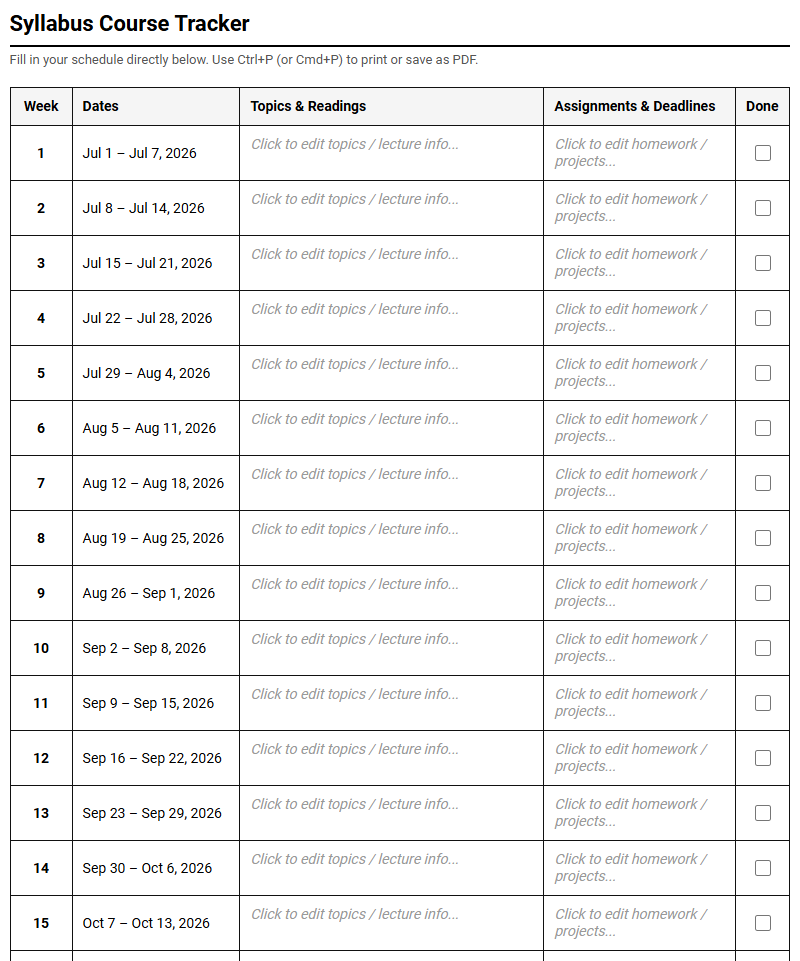
Managing complex course schedules remains a constant struggle for students striving to balance overlapping deadlines. While standard institutional funding often covers basic agendas, these generic resources fail to address specific tracking needs. Utilizing a printable Syllabus Tracker Calendar grants immediate clarity, though users must stipulate time weekly for manual updates. By visualizing milestones-such as multi-stage research paper deadlines-this tool bridges the gap. Below, we outline how to effectively implement this calendar to optimize your semester.
Create Your Syllabus Tracker Calendar
Done customizing?
Syllabus Tracker Calendar - Good to Know
Academic Milestone Tracker
Managing long-term educational objectives requires a systematic approach to visualization. An Academic Milestone Tracker serves as a high-level roadmap for your entire degree program, allowing you to monitor progress toward graduation, major requirements, and thesis completions. By mapping out significant academic hurdles early, you can prevent credit deficiencies and ensure you meet departmental prerequisites on time.
This tracking system categorizes progress into three distinct phases:
- Foundational Phase: Completion of core general education requirements and introductory prerequisite courses.
- Specialization Phase: Advanced upper-division lectures, lab work, and declare-of-major milestones.
- Capstones & Graduation: Thesis submissions, internship hours, comprehensive examinations, and final credit audits.
Using this structured breakdown, students gain clear insight into their academic journey, ensuring no critical degree requirements are overlooked as they transition from semester to semester.
Course Workload Mapping
Not all credits are created equal, and understanding the demands of your schedule is crucial for maintaining a healthy balance. Course Workload Mapping involves assessing the subjective and objective difficulty of each enrolled module to prevent academic burnout.
To implement an effective workload map, consider grading your courses based on three vital metrics:
- Weekly Reading Volume: The sheer number of textbook pages, research papers, or case studies assigned.
- Technical Difficulty: The complexity of the material, requiring dedicated problem-solving sessions or lab hours.
- Assessment Frequency: How often you are graded via quizzes, weekly essays, or practical examinations.
By mapping these variables, you can strategically pair demanding quantitative courses with highly conceptual lectures, creating a balanced and manageable weekly routine that preserves your mental energy.
Notion Syllabus Dashboard
A fragmented digital workspace leads to missed details and disorganization. Creating a centralized Notion Syllabus Dashboard solves this by consolidating disparate course documents into a unified database system. Instead of constantly opening separate PDFs, students can extract key information and store it in an interactive, searchable workspace.
A robust digital dashboard should incorporate specific relational database properties:
- Relation to Assignments: Connect your syllabus directly to your main task list.
- Professor Contact Hub: Store office hours, email addresses, and lecture hall locations.
- Resource Repository: Link digital textbooks, lecture slides, and supplementary reading materials.
Centralizing your academic resources within a database ensures that critical course policies, grading rubrics, and project guidelines are accessible in a few clicks.
Assignment Deadline Countdown
Procrastination thrives in the absence of visual urgency. An Assignment Deadline Countdown transforms abstract dates into concrete, actionable timeframes. By calculating the exact number of days remaining until an exam or paper submission, this tool helps students prioritize their daily task lists based on true urgency.
Whether built using spreadsheet formulas or database code, a countdown system is most effective when it categorizes deadlines dynamically:
For instance, items due within 48 hours receive an urgent red flag, prompting immediate action. Assignments scheduled for the upcoming week are highlighted in yellow, signaling the need for active drafting, while tasks further out remain green. This visual hierarchy guides your attention to where it is needed most, reducing deadline anxiety.
Study Time Blocking
Vague study plans like "study biology tonight" often lead to distraction. Study Time Blocking is a time-management method where you divide your day into distinct, dedicated blocks of time, each reserved for a specific academic task. This method fosters deep focus by eliminating the cognitive load of multitasking.
To build an optimized daily schedule, utilize a structured blocking workflow:
- Identify Deep Work Windows: Locate your peak cognitive hours, usually in the morning, for complex problem-solving.
- Integrate Buffer Blocks: Allocate short periods for administrative tasks like replying to emails or organizing files.
- Schedule Recovery Intervals: Insert mandatory breaks to rest your mind and prevent cognitive fatigue.
Treating these blocks as non-negotiable appointments with yourself ensures steady progress on demanding projects without sacrificing your personal well-being.
Semester Overview Calendar
A macro-level perspective is vital for navigating the academic year successfully. A Semester Overview Calendar acts as a single-page visual map of the entire term, highlighting major evaluation periods, university holidays, and administrative deadlines. This birds-eye view prevents students from being blindsided by clustered exams.
Key dates to integrate into your semester overview include:
- Add/Drop Deadlines: The final dates to adjust your schedule without academic or financial penalties.
- Midterm Clusters: Periods where multiple examinations overlap, requiring advance preparation.
- Final Exam Schedule: The culminations of your courses, which often dictate travel or study plans.
By plotting these critical dates on a single timeline, you can anticipate high-stress weeks and begin preparing for exams weeks in advance.
Spaced Repetition Study Planner
Cramming before an exam leads to rapid forgetting immediately afterward. The Spaced Repetition Study Planner leverages cognitive science to optimize memory retention by scheduling review sessions at scientifically calculated intervals. This technique counteracts the natural forgetting curve, ensuring information transitions into long-term storage.
A standard spaced repetition schedule progresses through calculated review milestones:
- Review 1: One day after the initial lecture to consolidate immediate concepts.
- Review 2: Three days after the first review to reinforce weak memory traces.
- Review 3: One week later to solidify core structural knowledge.
- Review 4: One month later to finalize long-term retention before exams.
Tracking these intervals ensures you spend study hours only on material that is on the verge of being forgotten, maximizing study efficiency.
Grade and Syllabus Tracker
Maintaining awareness of your current standing in a class is essential for academic strategy. A Grade and Syllabus Tracker calculates your weighted averages in real-time based on the specific grading criteria outlined in each course syllabus. This quantitative approach removes guesswork and helps you identify where to direct your focus.
An effective grade tracking database structure includes:
- Weighting Categories: Differentiating between homework (15%), midterms (30%), and final projects (40%).
- Score Input: Recording individual grades immediately after they are returned by instructors.
- Target Projections: Calculating the minimum score required on upcoming exams to achieve your desired final grade.
This data-driven perspective empowers you to make informed decisions about study priorities, especially during busy midterm and final examination weeks.
Class Schedule Syncer
With lectures, seminars, laboratory sessions, and study groups scattered throughout the week, scheduling conflicts can quickly arise. A Class Schedule Syncer acts as the central link connecting your academic schedule with your personal digital calendar. It ensures that changes made to university schedules are reflected instantly across all your devices.
To maintain an organized digital calendar, follow these synchronization best practices:
- Integrate ICS Feeds: Subscribe to your university registrar's calendar link for automatic updates.
- Color-Code Activities: Use distinct colors for lectures, office hours, and student club meetings.
- Set Geo-Location Alerts: Embed classroom building numbers and campus maps directly into calendar event details.
Streamlining your schedule reduces the risk of tardiness or missed classes, allowing you to move through your busy academic days with confidence.
Academic Backlog Tracker
Even the most organized students occasionally fall behind on coursework. An Academic Backlog Tracker is a specialized tool designed to catalog missed readings, skipped lectures, or incomplete assignments, preventing them from becoming forgotten liabilities that derail your final grades.
When cataloging backlog items, categorize them to facilitate systematic catching up:
- Low Priority: Non-tested readings or optional supplementary video materials.
- Medium Priority: Weekly homework exercises or basic discussion board posts.
- High Priority: Core lecture notes, mandatory project benchmarks, and exam review sheets.
By maintaining a dedicated list of backlogged items, you can systematically dedicate a few hours each week to catching up, ensuring that you enter finals week with zero learning gaps.
Leave a comment