
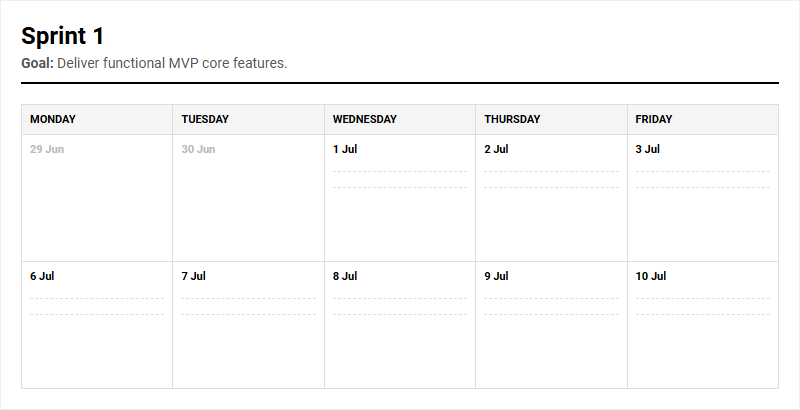
Managing fast-paced sprint cycles often leads to team misalignment and overlooked bottlenecks. While teams traditionally rely on complex digital software or basic spreadsheets for tracking, a physical Agile Scrum Sprint Board printable calendar grants immediate tactile clarity and focus to daily standups. Note that while this tool requires disciplined manual updates, its physical presence drastically improves team accountability. Below, we outline how to integrate this tracker to optimize your sprint planning and retro processes.
Create Your Agile Scrum Sprint Board Calendar
Done customizing?
Agile Scrum Sprint Board Calendar - Good to Know
Burndown Chart
A Burndown Chart is a powerful visual representation used in Agile project management to track the completion of work over a specific timeframe, typically a sprint. The horizontal axis represents time, while the vertical axis indicates the outstanding work, often measured in story points or hours. By plotting a diagonal line from the start of the sprint to the end, representing the ideal progress, teams can easily compare their actual progress against this baseline.
Using this chart provides key advantages to the team:
- Real-time visibility: Offers immediate insight into whether the team is on track to finish.
- Early warning signs: Identifies scope creep or potential bottlenecks early in the development cycle.
- Enhanced predictability: Helps project future performance based on historical trends.
This visual aid fosters transparency and accountability, ensuring the development team remains aligned and can make data-driven adjustments before the sprint concludes.
Capacity Planning
Capacity Planning is the strategic process of determining the maximum amount of work an Agile team can realistically commit to during an upcoming sprint. Unlike simple velocity-based planning, it accounts for real-world variables such as team availability, public holidays, planned paid time off (PTO), and dedicated time for administrative tasks or meetings.
To calculate capacity accurately, teams often follow these essential steps:
- Calculate the total available hours for each individual team member.
- Subtract time for non-development activities like meetings, emails, and administrative work.
- Adjust for historical focus factors or individual team efficiency rates.
By establishing a realistic baseline, product owners avoid over-committing the team. This prevents burnout, maintains high morale, and ensures the sustainable delivery of high-quality software, creating a predictable rhythm for stakeholders.
Scrumban
Scrumban is a hybrid project management framework that combines the structured discipline of Scrum with the continuous, visual flow of Kanban. It was originally designed as a transition model to help teams move from Scrum to Kanban, but it has evolved into a highly effective standalone methodology.
From Scrum, it retains elements like structured ceremonies (such as daily stand-ups and retrospectives) and cross-functional team roles. From Kanban, it adopts continuous workflow visualization, pulling work rather than pushing it, and strict limits on work in progress. Key benefits include:
- High flexibility: No rigid sprint planning is required; tasks are pulled as capacity opens.
- Reduced overhead: Minimizes time spent on estimation and elaborate planning sessions.
- Continuous improvement: Teams focus on optimizing flow and cycle times.
This methodology is particularly suited for fast-paced, unpredictable environments like maintenance, support, or highly volatile startups.
Swimlanes
Swimlanes are horizontal rows used on Kanban or Scrum boards to categorize and compartmentalize tasks visually. While vertical columns represent the stages of a workflow (such as To Do, In Progress, and Done), horizontal swimlanes divide these tasks based on specific criteria to enhance organization and prioritization.
Common ways to categorize swimlanes include:
- Priority/Expedite: A dedicated lane for urgent bugs that must bypass the standard queue.
- Teams or Individuals: Separating tasks by sub-teams or individual owners to clarify ownership.
- User Stories or Epics: Grouping sub-tasks under their parent initiatives.
By implementing swimlanes, teams can prevent clutter on their boards, ensure critical issues receive immediate attention, and gain a clearer understanding of how different types of work are progressing simultaneously.
Work in Progress Limits
Work in Progress (WIP) Limits are explicit constraints placed on the number of tasks that can exist in any single workflow state at one time. A fundamental pillar of Kanban, WIP limits encourage a "stop starting, start finishing" mindset among team members.
When a column reaches its maximum limit, no new tasks can be pulled into that stage until an existing task is moved forward. This mechanism forces the team to collaborate on resolving current bottlenecks rather than starting new work. Key advantages include:
- Reduced multitasking: Minimizes context switching, which degrades cognitive performance.
- Improved flow: Promotes a smoother, more predictable delivery pipeline.
- Waste elimination: Highlights inefficiencies and resource constraints instantly.
By restricting the volume of active tasks, teams achieve higher throughput, superior quality, and faster cycle times.
Timeboxing
Timeboxing is an effective time management technique where a fixed, unyielding limit is allocated to a specific activity or event. In Agile frameworks like Scrum, timeboxing is applied to almost every ceremony, including daily stand-ups (15 minutes), sprint planning (often 2 hours per week of sprint), and the sprint itself (typically 2 to 4 weeks).
The primary goal of timeboxing is to enforce focus and prevent Parkinson's Law, which states that work expands to fill the time available for its completion. Key benefits include:
- Enforced focus: Teams prioritize high-value tasks within the allotted window.
- Reduced perfectionism: Encourages pragmatic, iterative progress over endless refinement.
- Predictable cadence: Establishes a dependable rhythm for both developers and stakeholders.
When a timebox expires, work stops immediately, prompting evaluation and adjustment during the next cycle.
Cumulative Flow Diagram
A Cumulative Flow Diagram (CFD) is an advanced analytical tool used in Kanban and Agile methodologies to visualize the state of work over time. The diagram plots the total number of work items on the vertical axis against time on the horizontal axis, with band colors representing different workflow stages (e.g., Backlog, In Progress, Testing, Done).
Analyzing the shape and thickness of these bands yields vital insights:
- Band thickness: A widening band indicates a bottleneck forming in that specific stage.
- Parallel bands: Parallel lines signify a stable, consistent, and predictable workflow.
- Slope gradient: The rise of the "Done" band reflects the team's throughput rate.
This metric allows managers and teams to diagnose systemic issues, measure lead and cycle times, and optimize the overall system capacity with precision.
Velocity
Velocity is a fundamental metric in Agile Scrum that measures the average amount of work a development team completes during a single sprint. It is typically expressed in story points, hours, or number of tasks resolved.
Rather than serving as a measure of productivity or a tool for comparison between different teams, velocity is strictly a planning metric. Best practices for utilizing velocity include:
- Use historical averages: Base future sprint commitments on a rolling average of past sprints.
- Maintain consistency: Ensure story point estimation scales remain stable.
- Avoid weaponization: Never use velocity to pressure teams, as this leads to point inflation.
By tracking this metric over several sprints, product owners can forecast release dates more accurately and make informed commitments to stakeholders regarding the product roadmap.
Sprint Backlog
The Sprint Backlog is a dynamic subset of the product backlog selected specifically for execution during the current sprint. Owned entirely by the development team, it represents the team's plan for delivering the product increment and achieving the sprint goal.
It contains both the high-level user stories committed to and the granular, technical sub-tasks required to complete them. As the sprint progresses, the team updates this backlog daily to reflect active work. Core characteristics include:
- Dynamic nature: The backlog can be modified as new information emerges, provided the sprint goal is not compromised.
- High transparency: Serves as a visible, real-time representation of the team's current commitments.
- Self-organization tool: Empowers developers to pull work independently without top-down assignment.
Definition of Done
The Definition of Done (DoD) is a shared, formal agreement within an Agile team that outlines the strict quality criteria a product backlog item must meet before it can be considered complete. This checklist ensures that everyone-from developers to stakeholders-has a unified understanding of what "done" truly means.
A robust DoD typically includes criteria such as:
- Technical standards: Code must be peer-reviewed, refactored, and merged.
- Testing requirements: Unit, integration, and regression tests must pass.
- Documentation: User guides, API documentation, or release notes must be updated.
- Deployment: The feature must be deployed to a staging or production-like environment.
By maintaining a rigorous and transparent Definition of Done, teams prevent technical debt, ensure consistent product quality, and build trust with stakeholders.
Leave a comment